
Link Litmus Chrome Extension
Quickly assess domains against blacklist criteria with ease using this intuitive Chrome extension.
Powered by

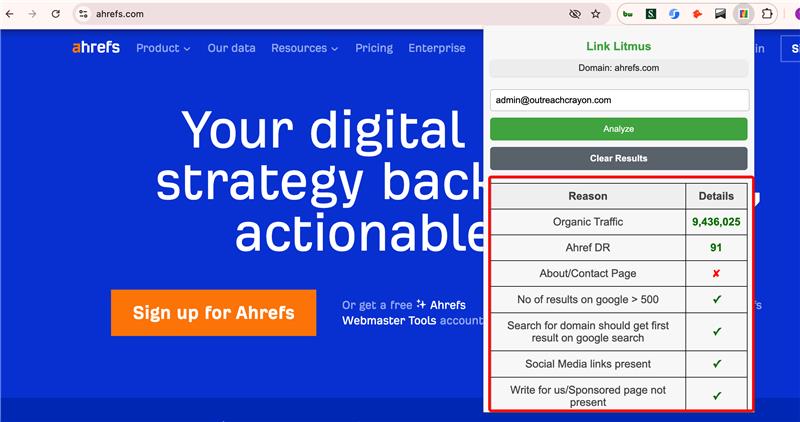
How Link Litmus Works
Step 1: Install the Extension
Add Link Litmus to your Chrome browser by clicking "Add to Chrome." The extension integrates seamlessly into your workflow for effortless domain analysis.
Step 2: Analyze Domains
Open the extension from the Chrome toolbar, input the domain you wish to evaluate, and click the "Analyze" button. The tool scans the domain against multiple blacklist criteria in real time.
3. Review Results
Instantly access a detailed report on the domain's blacklist status. Use this comprehensive analysis to ensure secure and compliant online interactions.
Frequently Asked Questions
2500+ Happy Agencies & Brands


reviewed by Keith Rudge
Supply Chain Manager
For fully managed WordPress installs, WPEngine is my Go-To
"OutreachCrayon's effective outreach campaigns have led to a remarkable 50% increase in engagement and interactions within the e-commerce sector. Their adept networking strategies have fostered valuable partnerships and collaborations, driving significant business growth."

reviewed by Advait
CTO
For fully managed WordPress installs, WPEngine is my Go-To
"OutreachCrayon Link Building & SEO Services impressively increased the DA PA by four times, achieving SEO objectives. The team used digital project management, effectively overseeing the planning and executions. Overall, they consisted of knowledgeable members who outstandingly performed tasks."

reviewed by Sevada Hemelians
Chief Marketing Technologist
For fully managed WordPress installs, WPEngine is my Go-To
"The end client was happy that their sales have increased by 1000%, thanks to OutreachCrayon Link Building & SEO Services. The team provided monthly performance reports and communicated weekly via Slack. The client was satisfied with the results and was impressed by the team's dedication."

reviewed by A. Jacobson
For fully managed WordPress installs, WPEngine is my Go-To
"Thanks to OutreachCrayon Link Building & SEO Services, the sites have improved their ranking; some of them are now in the number one position, while others have moved up 50 positions or more. The team is well-organized and effective. They provide constant reports and communicate via email and Zoom."

reviewed by Endre Rex-Kiss
Senior Strategist
For fully managed WordPress installs, WPEngine is my Go-To
"OutreachCrayon successfully built 125 links with an average domain authority of 63, boosting our pages' rankings on search results. The team was communicative, organized, responsive, and flexible."

reviewed by Susan Williams
Retail Project Manager
For fully managed WordPress installs, WPEngine is my Go-To
"OutreachCrayon's outreach campaigns have significantly boosted our engagement and interactions within our industry. Their strategic networking initiatives have led to valuable partnerships and collaborations that have fueled our business growth."

reviewed by Albert Chalfant
Director, Communication Skills Training Company
For fully managed WordPress installs, WPEngine is my Go-To
"OutreachCrayon's work has significantly increased our website traffic and exceeded our expectations. The team is highly communicative, keeping us informed through virtual meetings, email, and messaging apps. Their dedication and effectiveness are impressive."


