

Magnific.com
Key Takeaways
- Bing rewards different signals than Google — domain age, exact-match domains, backlink quality over quantity, and social signals all carry more weight.
- Bing Webmaster Tools (BWT) is free and gives you Site Summary, Search Performance, Crawl Information, Index Explorer, and Backlink Data in one dashboard.
- Verification takes just a few steps: add a site, confirm ownership (meta tag, XML/HTML upload, or DNS), and you’re in.
- BWT’s Keyword Research Tool, Search Performance Report, and API help you find and track the keywords actually driving traffic on Bing.
- Site structure and content fundamentals — mobile-friendliness, clear hierarchy, sitemaps, canonical tags, and original content — remain the backbone of ranking well on Bing.
Are you ready to explore Bing SEO and discover its hidden potential? In an era dominated by Google, it is hard to notice the reservoir of opportunities presented by Bing search.
However, what if we told you that you could attract additional people to your niche and increase your online visibility with the right tools and strategies? Here is where Bing Webmaster Tools (BWT) comes into play.
However, what is Bing SEO, and why does it matter? What is the distinguishing characteristic between Bing and Google SEO? You may have these questions right as you start learning how to use the Bing search algorithm.
Do not worry, as we will guide you into a realm where Bing isn’t merely a search engine alternative but a profitable solution for your digital existence.
Bing’s numbers back this up. According to Backlinko, Bing’s global search market share has climbed steadily in recent years — from around 3.2% in 2022, to 2.97% in 2023, 3.43% in 2024, 3.94% in 2025, and roughly 5.1% by April 2026. Backlinko also reports Bing now draws more than 1 billion daily unique visitors and generated $13.88 billion in net ad revenue in 2025. That’s a smaller slice of the pie than Google, but it’s a growing one — and one that’s largely underserved by SEOs who optimize for Google alone.
These data prove just how suitable Bing is for engaging a variety of followers and increasing your web visibility. In this blog, we will discover the efficacy of Bing Webmaster Tools and its potential to change your SEO game.
Table of Contents
- Understanding Bing SEO
- Key Differences Between Bing and Google Algorithms
- Getting Started with Bing Webmaster Tools
- Overview of the Dashboard and its Features
- Verifying Your Website Ownership
- Leveraging BWT for Keyword Research
- Optimizing Website Structure for Bing
- Content Optimization Techniques for Bing
- Utilizing BWT for Technical SEO
- FAQs
- Mastering Bing SEO Starts with BWT
Understanding Bing SEO

semrush.com/blog
Bing SEO is a procedure that involves optimizing websites to achieve higher ranking positions in the Bing search engine’s results pages (SERPs).
While most SEO principles are common across different search engines, it is important to understand the specific factors of Bing to achieve success.
Bing highly values elements like domain age, exact match domain names, and social signals. Besides that, the process of crawling and indexing content in Bing may be slightly different from Google’s; therefore, it requires different methods of optimization.
Key Differences Between Bing and Google Algorithms
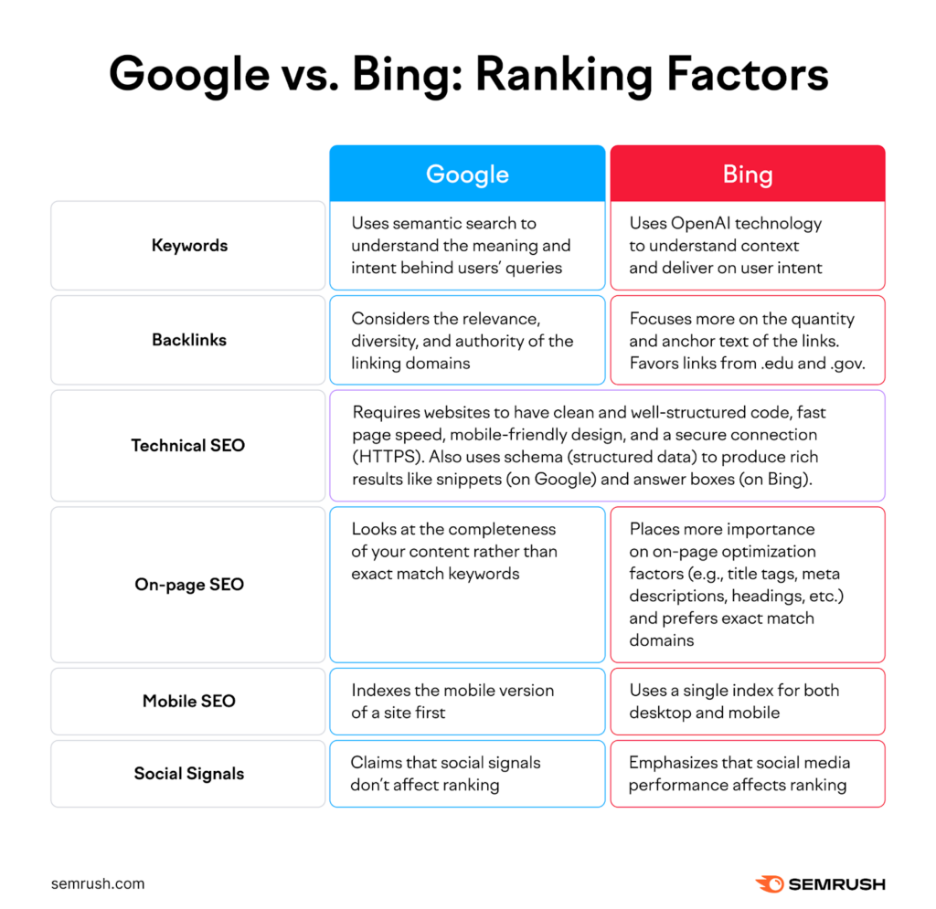
semrush.com/blog
Exploring the nuances of Bing and Google algorithms reveals secrets important for executing successful search engine optimization campaigns. Here’s how they differ:
- Domain Age and Exact Match Domains
Unlike Google, which prioritizes fresh and relevant content, Bing tends to favor older domains and exact match domain names.
Older, long-established websites may dominate in Bing’s rankings, even if their content is not updated on a regular basis.
As you type the keyword “best Swiss knives” into Google, you can immediately notice the knowledge graph occupying much of the space at the top, along with sponsored results.
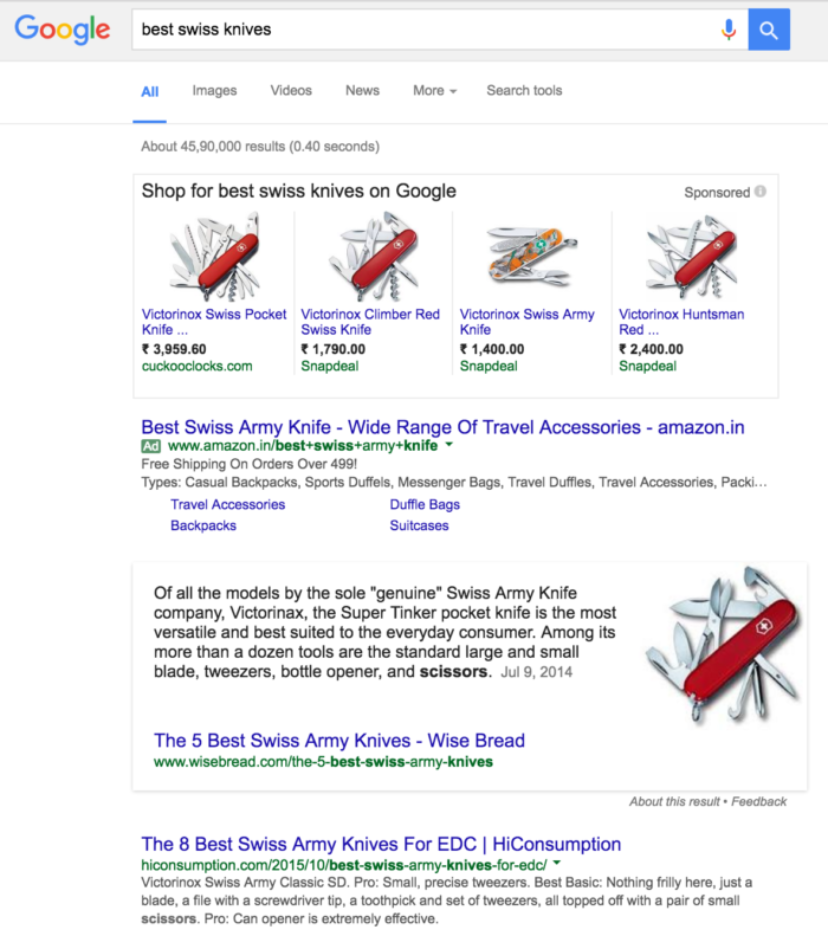
neilpatel.com/blog
On the other hand, on Bing, the first result stems from the domain “bestpocketknifetoday.com,” which means the importance of the exact match domains to be the most significant ranking factor. However, this domain is not listed in the top 10 results on Google.
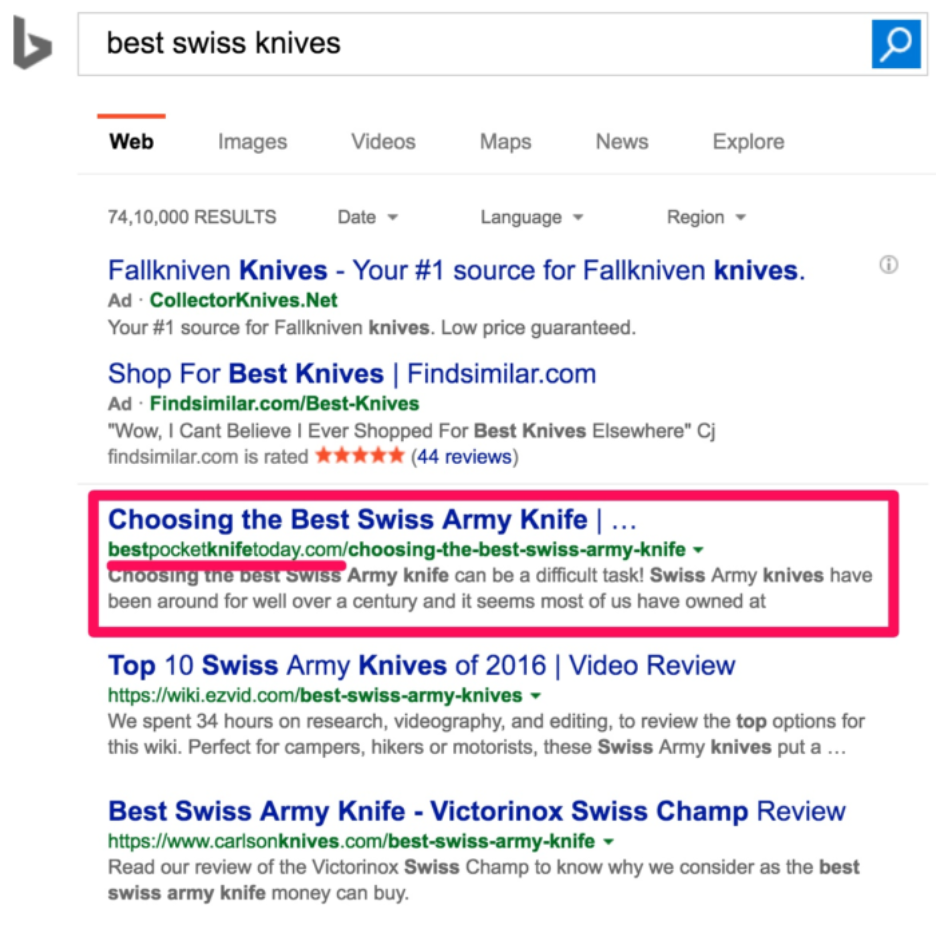
neilpatel.com/blog
- Backlink Quality vs. Quantity
Though all search engines regard backlinks as a ranking factor, Bing places more emphasis on the quality of the links than the quantity. Therefore, Bing will pay more attention to websites with high-quality backlinks from authoritative sites while ranking.
As Search Engine Journal puts it, Bing “prefer[s] backlinks from quality sites in smaller quantities” rather than chasing volume.
- Technical Factors
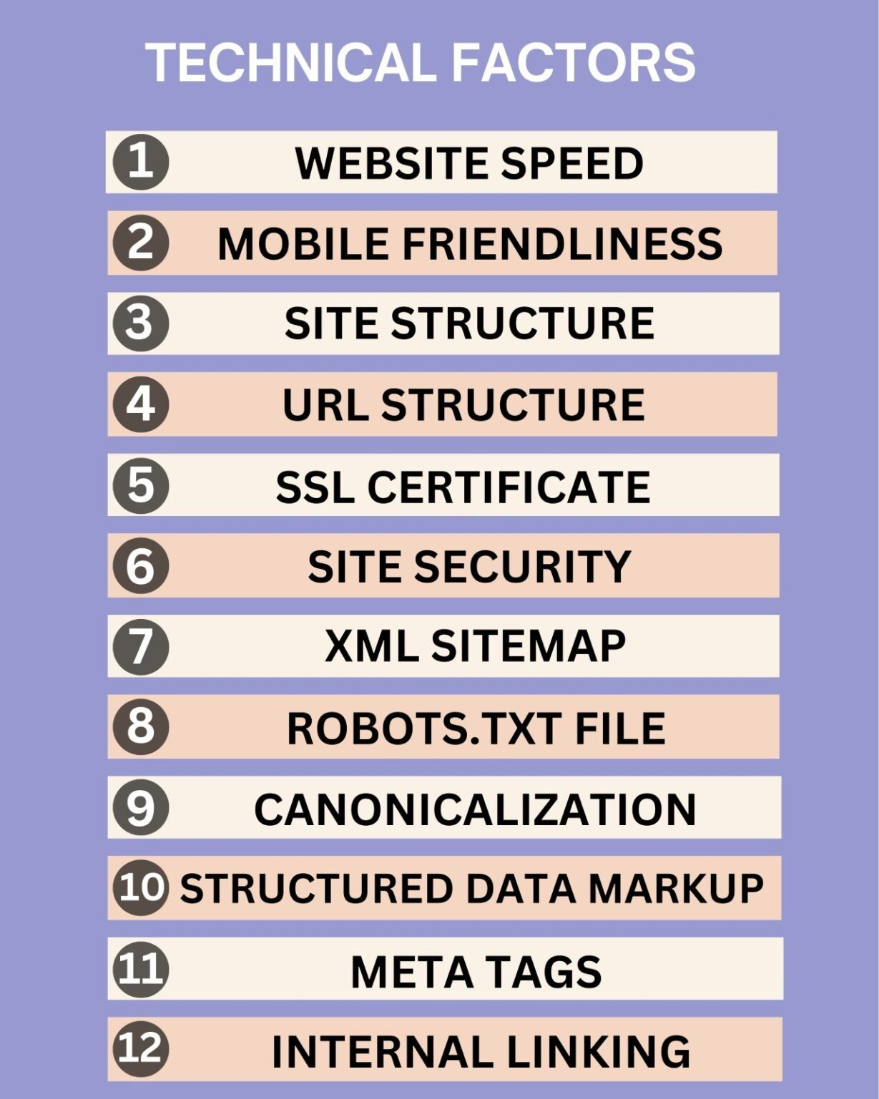
Bing’s algorithm might treat technical aspects of a website in a way that is divergent from Google. Factors, such as site architecture, URL format, and meta tags may result in different rankings on Bing compared to Google.
Getting Started with Bing Webmaster Tools
The first step in optimizing a website, especially for Bing, is Bing Webmaster Tools (BWT). From opening an account to confirming website ownership and discovering how the dashboard works, this section will help you to begin using BWT.
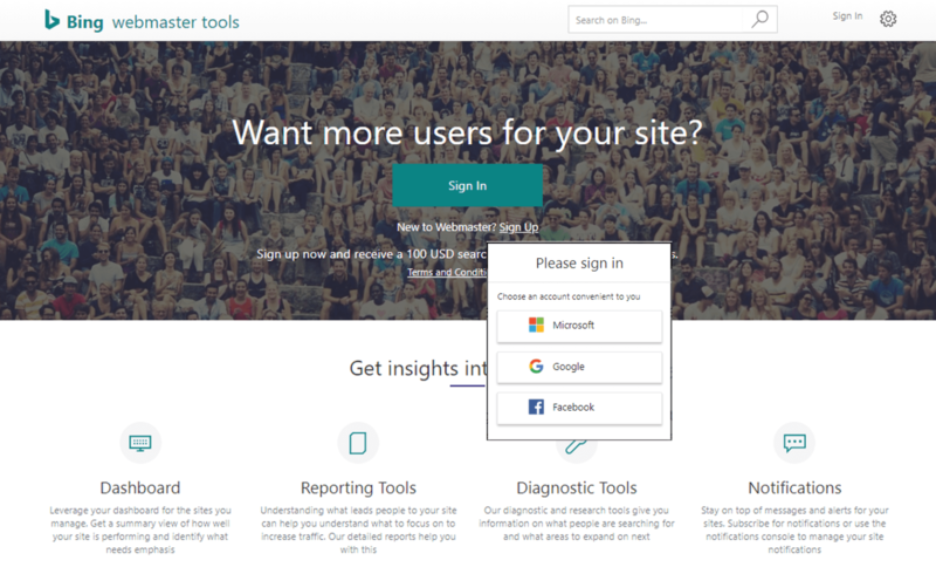
Creating a BWT account is your stepping stone to accessing a treasure box full of priceless tips and features that will skyrocket your site ranking on Bing Search. Here’s how to get started:
- Go to the Bing Webmaster Tools website at bing.com/webmasters and log in with a Microsoft account. If you do not have one, then just create it for free.
geeksforgeeks.org
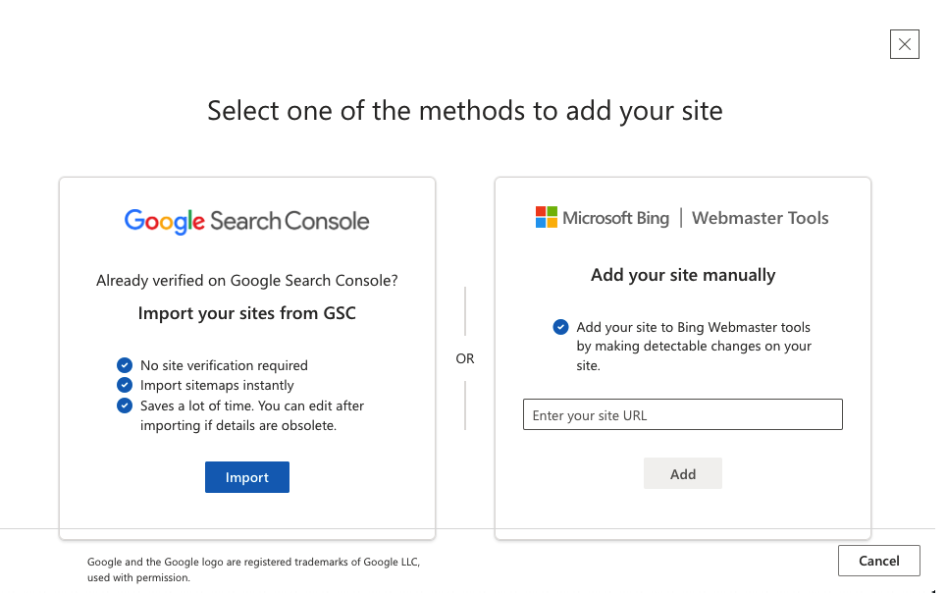
- After logging in, click on the “Add a Site” button to list your site on the BWT. Enter the link to your website, and then click on “Add.”
geeksforgeeks.org
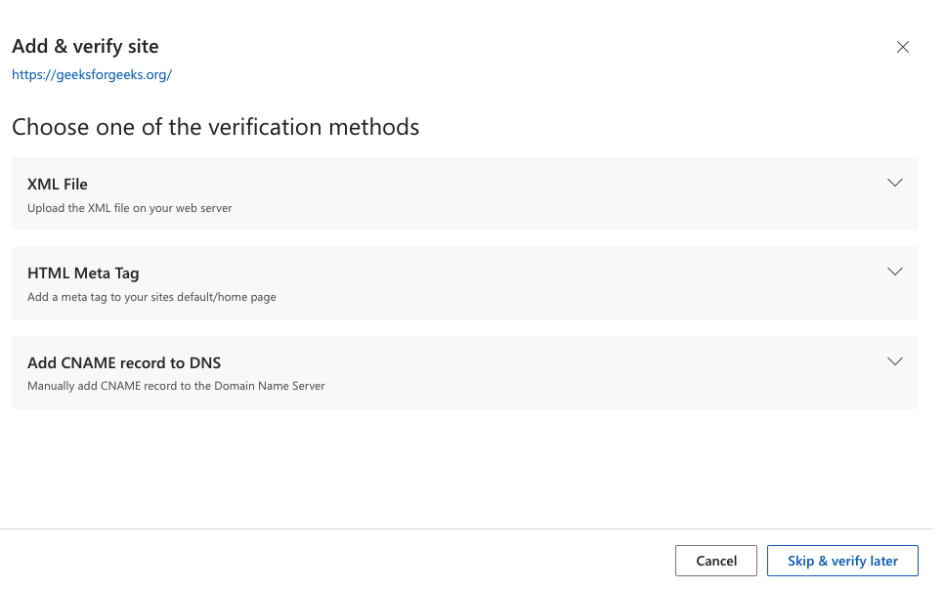
- Choose one of the provided options to validate the ownership of your website. It is possible to select the sort of verification either through a meta tag using HTML code or by uploading the XML file into the root directory of your website or by using the domain registrar.
- Follow the verification guide to finish the verification process. After you get verified, your website will be added to your BWT account. You will have all the tools and reports to measure and track the performance of your website on Bing search engine.
Neilpatel.com/blog
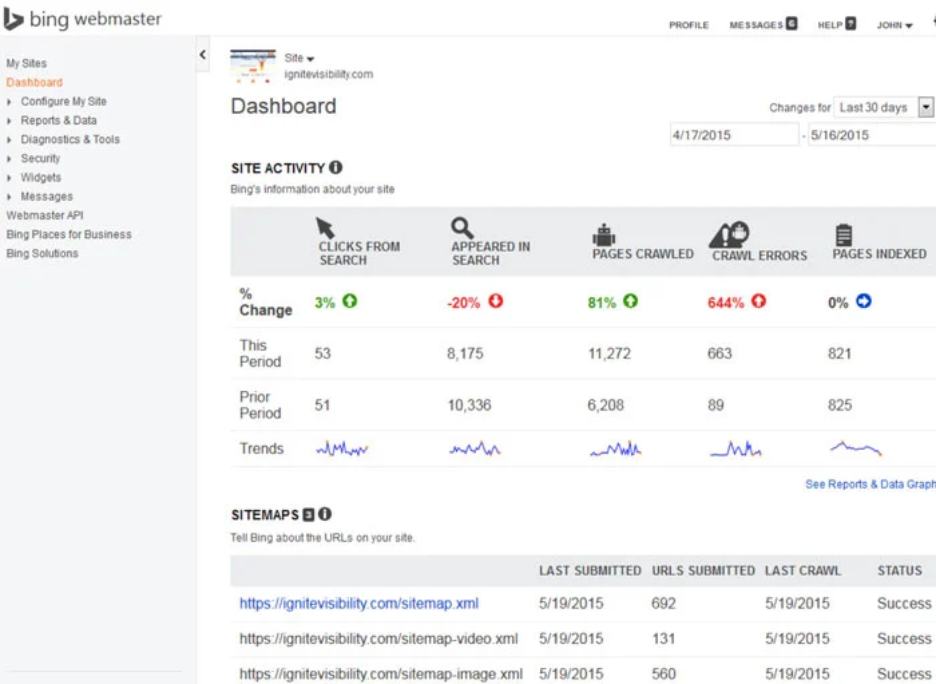
This is how the Dashboard looks in the Bing webmaster tool.
Overview of the Dashboard and its Features
When you add your site, you immediately gain entrance to the BWT dashboard, the single point of control for managing and improving your search position from Bing. The dashboard will give you the necessary insight and tools to understand the way your site performs in Bing’s search results. Here’s an overview of some key features:
- Site Summary: The dashboard contains a detailed overview of your website performance, like views, clicks, impressions, and CTR. This report covers the visibility of your site on Bing.
- Search Performance: Dive into your site’s search result performance with an in-depth report on search queries, clicks, and impressions. Identify keywords that rank well and evaluate your weaknesses to hone your SEO strategy.
- Crawl Information: Measure Bing’s web crawlers activities towards your site by using the crawl information reports. Diagnose crawl errors, blocked URLs, and other issues that may undermine your sites indexing and ranking in Bing.
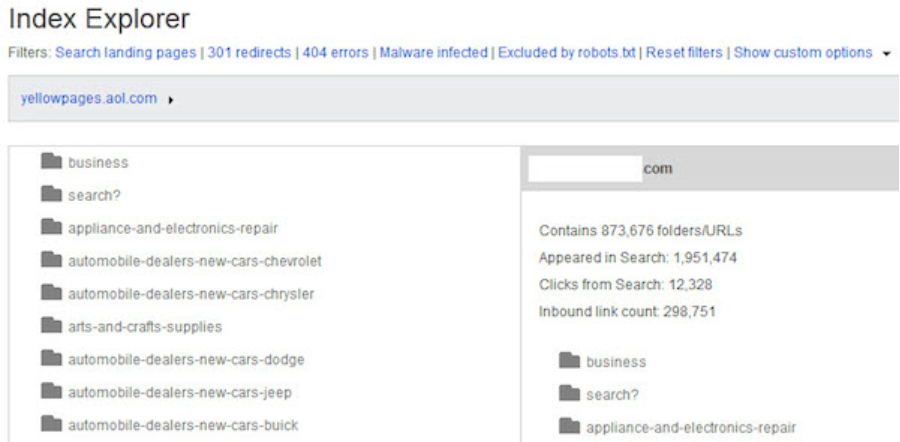
- Index Explorer:
searchenginewatch.com
Explore how Bing indexes your web pages and content via the Index Explorer tool. See a complete list of indexed pages, identify issues with indexing, and submit URLs for crawling and indexing.
- Backlink Data: Look at your website’s backlinks with the Backlink Data tool. Examine the quantity and quality of the links that point to your site, and look for ways to create and enhance your backlink profile.
Verifying Your Website Ownership
searchenginewatch.com
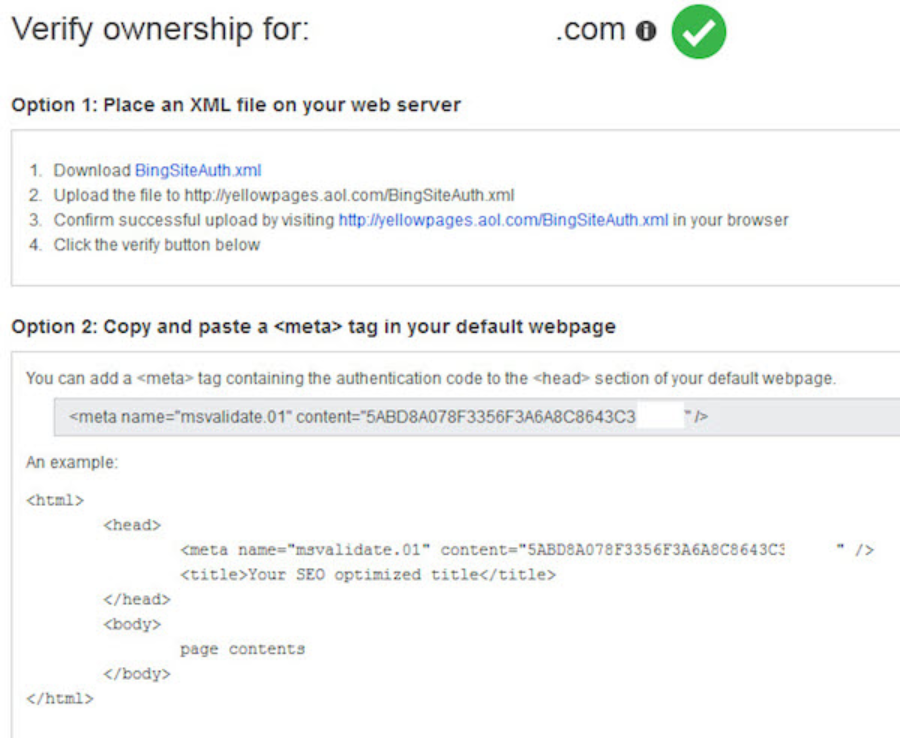
Before accessing BWT features and data, you will need to authenticate your website ownership. Verification guarantees that you have the right to manage the website and make changes related to the BWT account. There are several verification methods available, including:
- XML File Upload: Download a verification XML file by BWT and upload it to your website’s root directory.
- Meta Tag Verification: Add a meta tag given by BWT to your website’s homepage HTML code.
- DNS Verification: Add a TXT record to the DNS setup of your domain by entering the verification code provided by BWT.
- HTML File Upload: Download the HTML file verification from BWT and upload it to your site’s root directory.
After verifying your site ownership using any of these methods, you’ll have full access to BWT features and data. This will allow you to improve your website performance for optimal results in Bing search engines.
Leveraging BWT for Keyword Research
The purpose of using BWT in keyword research is to gain insight into visitor intent, make content more valuable, and enhance the searchability of a site in Bing. 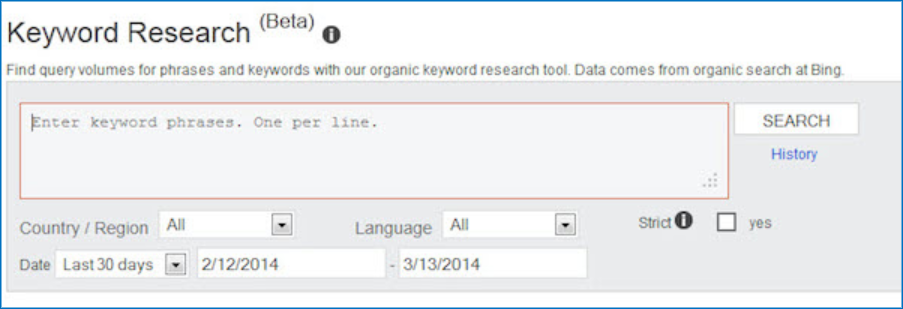
Bing Webmaster Tools offers various tools that allow you to conduct research related to a keyword and explore search queries relevant to your site. The following is a short description of some of the important tools:
- Keyword Research Tool: You can use this feature to identify new search words that can be applied to your site or to particular topics. You only need to enter the seed keywords or phrases, and then you have a list of the keywords with their current search volume, the level of competition, and possible traffic.
- Search Performance Report: The Search Performance Report will assist you in determining the keywords that land people on your site through the Bing search engine. This incorporates measurements of key performance indicators that comprise clicks, impressions, click-through rate (CTR), and position average. Based on this, you can observe the performance of keywords and where to improve.
- Keyword Research API: Advanced users and developers can access BWT through a keyword research API that enables you to programmatically retrieve keyword information. This API can be incorporated into your applications or tools to automate the process of conducting keyword research and simplify your SEO workflow.
Strategies for Selecting the Right Keywords for Your Content
To maximize the exposure and relevance of your site in Bing search results, it is important to select the right keywords in your content. The following are some of the strategies that can be used to select the most effective keywords:
- Relevance: Select the keywords that are relevant to your website, products, services, or target audience. Make sure that your keywords are relevant to the content and goal of your web pages.
- Search Volume: Your search volume needs to be big enough to bring meaningful traffic to your site. Pay attention to keywords that have high search volume and competition that is easy to contend with.
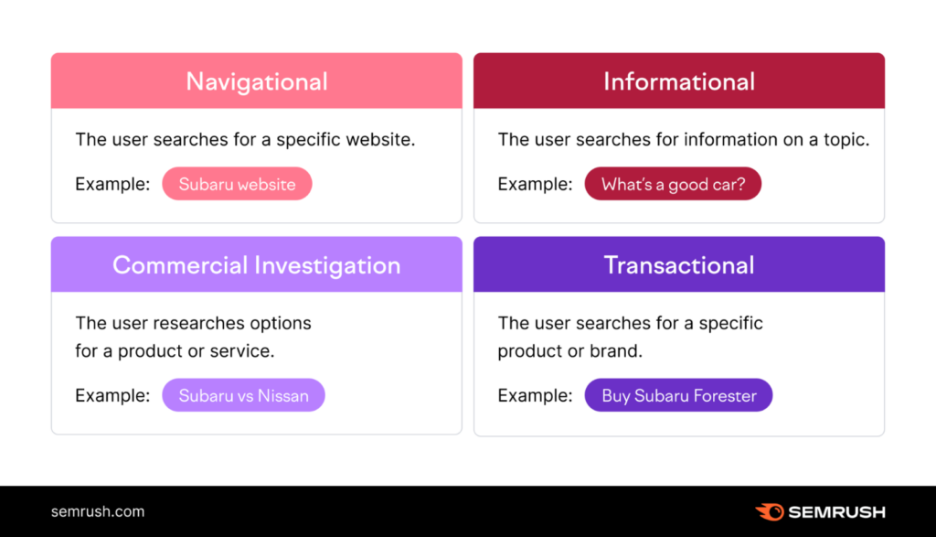
- User Intent:
semrush.com/blog
Think about the purpose of each keyword and how it corresponds to the goals of your website visitors. Optimize your content to satisfy user intent and provide valuable information or solutions to their queries.
- Diversification: Diversify your keyword approach by focusing on broad, niche, and long-tail keywords. This is the best way to make sure you capture a variety of search queries and target various segments of your target audience.
Optimizing Website Structure for Bing
Bing website optimization is a core element of search engine optimization (SEO) that has a direct effect on the visibility and positioning of your website in the Bing search results. A properly organized site will improve users’ experience and facilitate easier crawling, indexing, and interpretation of your content by search engines such as Bing.
After identifying the areas to improve with the help of BWT, you should implement the best practices to optimize the structure of your site to attract Bing. The following are some of the important strategies to be considered:
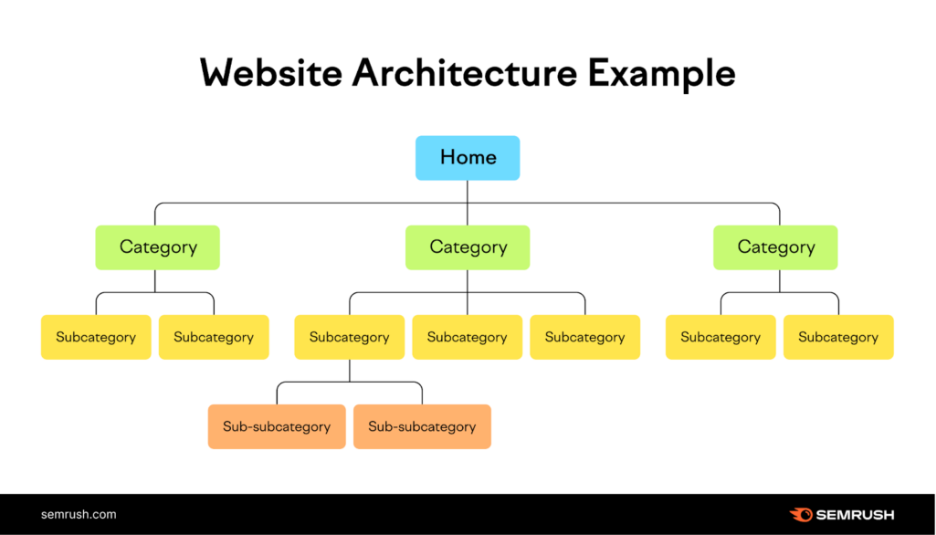
- Clear Hierarchy:
semrush.com/blog
Arrange the content of your site in a concise and rational hierarchy, using major categories, subcategories, and a single page. Enhance the hierarchy by using descriptive and keyword-based URLs, headings, and navigation links.
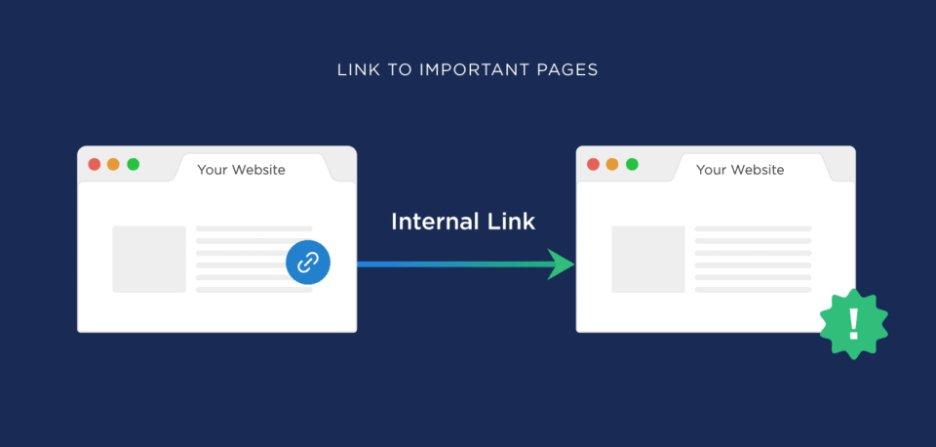
- Internal Linking:
backlinko.com
Make good use of internal links to establish a relationship between the related pages of your site. Internal linking assists in the distribution of link equity, enhancement of crawlability, and topical relevance of your content.
statista.com
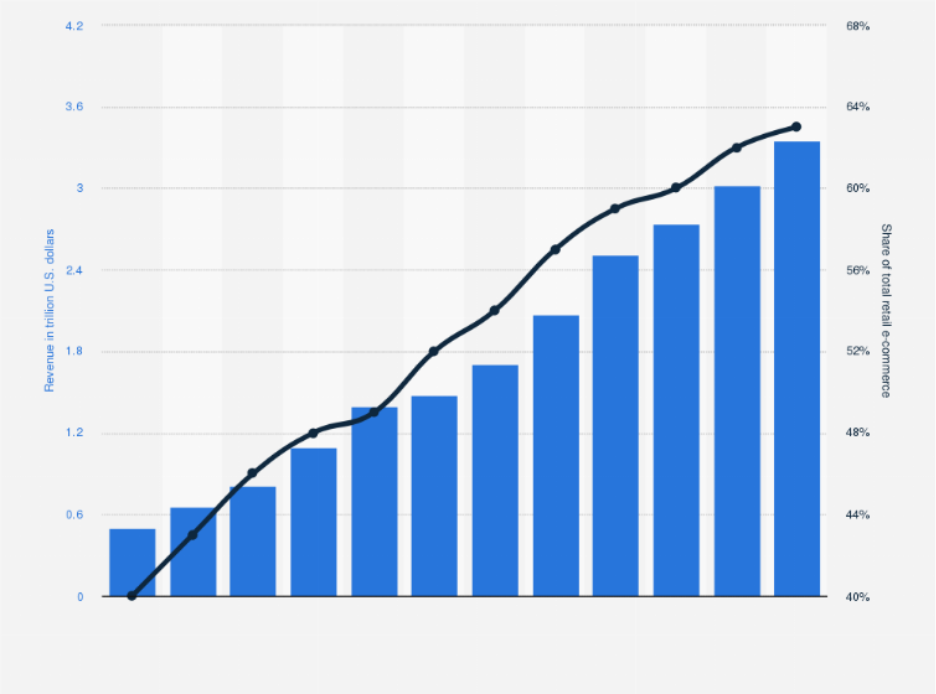
- Mobile-Friendly Design: Make your site mobile-friendly, because Bing gives more consideration to mobile-friendly sites on its search page. Apply responsive design to deliver a smooth user experience on various devices and screen dimensions. This is increasingly important each year, as Statista estimates that mobile commerce is the biggest part of global ecommerce sales to date, with about 60 percent of the total ecommerce sales being mobile in 2026, compared to 43 percent in 2018, which underlines just how much traffic and revenue a poorly optimized mobile experience can cost you.
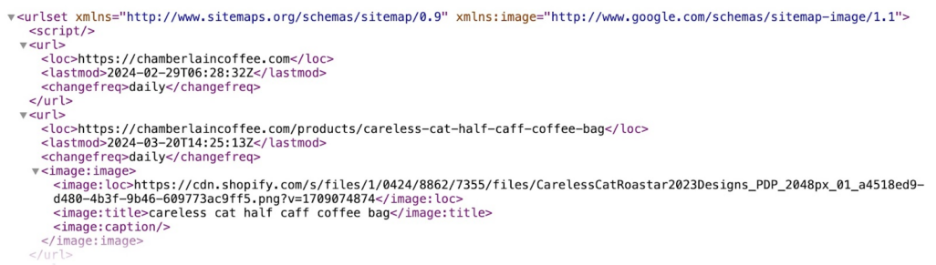
- XML Sitemap: Generate and submit an XML sitemap to Bing using BWT. A sitemap assists Bing in discovering and indexing pages in your site more effectively, especially with large or complex websites. The following is a sample of an XML sitemap:
semrush.com/blog
- Canonicalization

moz.com
Use canonical tags to address the problem of duplicated content and combine the link equity between duplicate or similar pages.
Canonicalization can help Bing know the preferred version of your content and prevent it from indexing different versions of the same page.
Content Optimization Techniques for Bing
Effective SEO is built upon content optimization, and in the case of Bing, it is essential to be familiar with its preferences and ranking considerations.
Bing Webmaster Guidelines stipulate that the search engine gives priority to websites with rich content and provides clear, deep, and readily accessible content.
Websites with thin content, excessive ads or affiliate links, or those that swiftly redirect visitors to other sites typically perform poorly in rankings. There must be rich content, interesting content, and easy navigation, which address the informational needs of the visitors.
Although most of these aspects fall under the umbrella of general SEO, there are a few Bing-specific nuances. The following is what you should know:
- Relevance: Like all search engines, Bing prioritizes content relevant to the user’s query. Ensuring your content addresses the user’s intent and includes relevant keywords is key to ranking well on Bing.
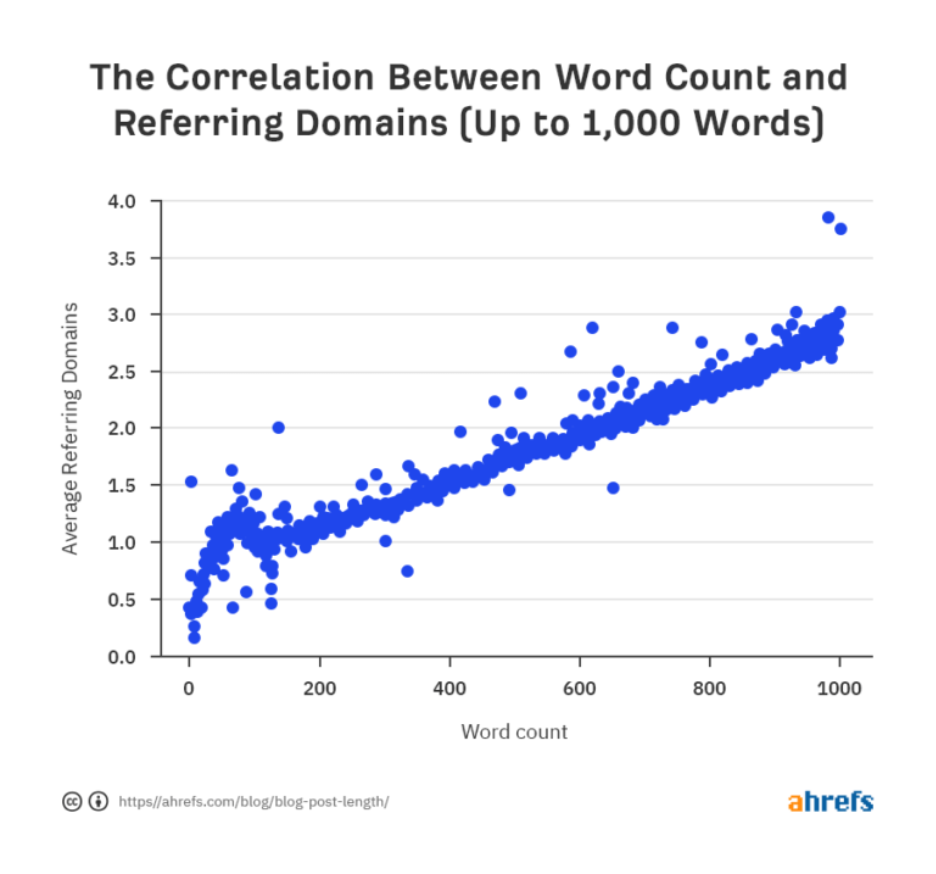
- Quality: Bing values high-quality content that provides value to users. This includes original, well-written, informative content that meets users’ needs. Avoid thin or duplicate content, as Bing may penalize websites with low-quality content — Ahrefs’ analysis of roughly 900 million pages found that thin, underdeveloped content consistently earns fewer backlinks than well-developed, in-depth pages.
Ahrefs.com
- Engagement Metrics
Bing takes into consideration user engagement metrics that include click-through rate (CTR), dwell time, and bounce rate when ranking content. Higher ranking in Bing search results is likely to be content that attracts clicks and makes users stay longer, and therefore has lower bounce rates.
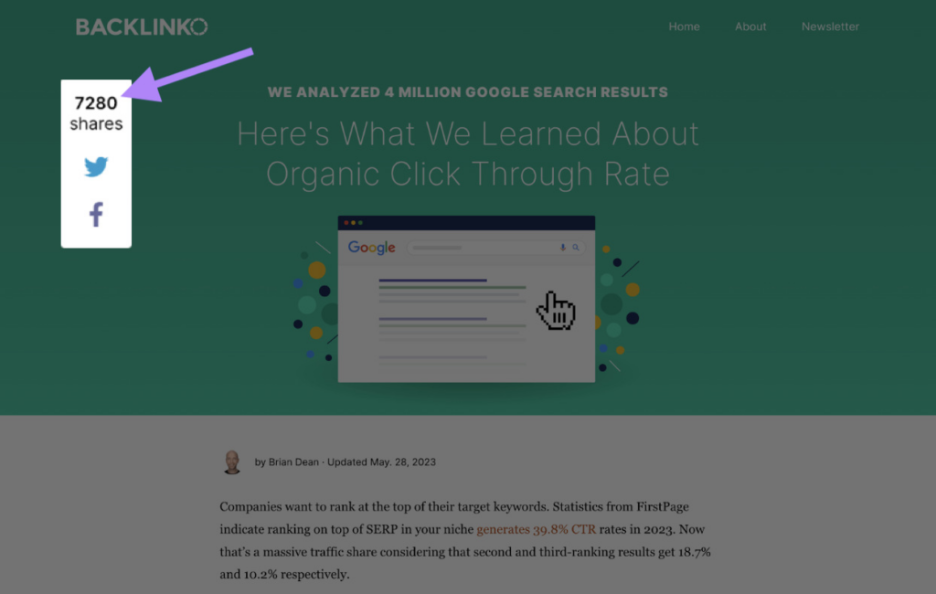
- Social Signals: Bing also takes into account social signals, like shares, likes, and comments on social media. When content is positively socially engaged, it might be perceived as more desirable by the Bing algorithm. Here’s an example of Backlinko displaying social signals on its blog page.
semrush.com/blog
Tips for Creating Bing-friendly Content that Resonates with the Audience
Creating content that resonates with Bing’s algorithm and your target audience is essential for SEO success. Bing identifies three pillars of quality content as: 
neilpatel.com/blog
The following are some tips regarding making content Bing-friendly:
- Focus on Relevance: Ensure your content is highly relevant to the topics and keywords you target. Use descriptive titles, headings, and meta tags to communicate the topic of your content to Bing’s crawlers. Below are examples of queries entered into Google and the inquiries they represent.
- Optimize for Long-tail Keywords: Target long-tail keywords that are less competitive and highly relevant to your audience. Include them naturally into your content to improve its visibility in Bing search results.
- Use Multimedia: Incorporate multimedia elements, including images, videos, etc., into your content to make it more engaging and appealing to users. Multimedia content can also help improve dwell time and reduce bounce rates, which are positive signals for Bing. While Google is recognized for prioritizing text and HTML, Bing’s algorithm may incentivize content incorporating more multimedia elements, such as images and video clips.
- Promote Social Sharing: Share your content by including social sharing buttons and calls to action. Actively engage with your target users on social media platforms to increase the reach and impact of your content. The payoff extends beyond rankings — Forbes reports that 44% of fans discover content on social media before going elsewhere to watch, listen, or buy — a figure that climbs to nearly 60% among Gen Z.
- Regularly Update and Refresh Content: Keep your content fresh and up to date by regularly updating and refreshing it with new information, insights, and perspectives. This signals Bing that your website is actively maintained and provides value to users over time.
Utilizing BWT for Technical SEO
Bing Webmaster Tools provides comprehensive support for various technical SEO aspects. Here’s an overview of some key areas covered by BWT:
- Site Health: BWT offers insights into your website’s overall health, including crawl errors, malware warnings, and security issues. Monitoring site health ensures your website is accessible to Bing’s web crawlers and visitors.
- Crawl Information: Use crawl information reports to analyze how Bing’s web crawlers interact with your website. Identify crawl errors, blocked URLs, and other issues that may impact your website’s indexation and ranking in Bing search results.
- Indexation Status: Monitor the indexation status of your website’s pages with the Index Explorer tool. View a list of indexed pages, identify indexing issues, and submit URLs for crawling and indexing if necessary.
- Site Speed: Evaluate your website’s performance with site speed reports in BWT. Identify opportunities to improve loading times, optimize server response times, and enhance user experience, which are factors considered by Bing’s algorithm.
- Mobile-Friendliness: Make sure your website is optimized for mobile devices with mobile-friendliness reports in BWT. Identify mobile usability issues, such as text readability, tap targets, and viewport configuration, and implement responsive design techniques to enhance mobile user experience.
Implementing Technical SEO Improvements Based on BWT Insights
Once you’ve analyzed the technical aspects of your website using BWT, it’s time to implement improvements based on the insights gathered. Here are some key steps to follow:
- Prioritize Fixes: Prioritize technical issues based on their severity and impact on your website’s performance and visibility. Focus on addressing critical issues, such as crawl errors and security vulnerabilities, before tackling less urgent matters.
- Implement Best Practices: Implementing technical SEO best practices BWT recommends to improve your website’s overall health and performance. Follow Bing’s guidelines for site speed optimization, mobile-friendliness, structured data markup, and other technical aspects to ensure compliance and maximize visibility in Bing search results.
- Monitor Progress: Regularly monitor the impact of technical SEO improvements on your website’s performance using BWT’s reporting and analysis tools. Track changes in crawl errors, indexation status, site speed, and mobile friendliness over time, and adjust your optimization strategy to achieve optimal results.
FAQs
1. Is Bing SEO different from Google SEO?
The core principles overlap — relevant content, good site structure, quality backlinks — but Bing places more weight on domain age, exact-match domains, and social signals, and can treat technical factors differently.
2. Is Bing Webmaster Tools free to use?
Yes. Creating an account and using its core features — Site Summary, Search Performance, Crawl Information, Index Explorer, Backlink Data, and Keyword Research — is free with a Microsoft account.
3. How long does verification take in BWT?
Usually just a few minutes once you’ve added the meta tag, uploaded the file, or added the DNS record — though DNS changes can take longer to propagate.
4. Do I need a completely separate SEO strategy for Bing?
Not entirely. Most on-page and technical SEO best practices apply to both engines; the difference is mainly in emphasis — backlink quality, domain age, social signals, and multimedia use matter more on Bing.
5. Is Bing still worth optimizing for?
For many sites, yes. Its global share is smaller than Google’s, but it remains the world’s second-largest search engine and continues to grow, which makes it a meaningful, often under-optimized traffic source.
Mastering Bing SEO Starts with BWT
Mastering Bing SEO with Bing Webmaster Tools is a strategy imperative for any website owner seeking to maximize their online visibility and reach.
By leveraging the unique insights and features offered by BWT, such as analyzing site performance, identifying technical issues, and understanding Bing’s ranking factors, website owners can optimize their websites effectively for Bing searches.
Through continuous monitoring, analysis, and optimization, businesses can boost their search engine rankings, attract organic traffic, and ultimately achieve their online objectives. With Bing Webmaster Tools as a guiding compass, website owners can confidently navigate the complexities of the Bing SEO landscape, unlocking new opportunities and accomplishing sustained success in the dynamic world of search engine optimization.


