
Key Takeaways
- Lumar (previously known as Deepcrawl) is a cloud-based crawler designed for speed and scale. Screaming Frog is a desktop-based crawler that offers comprehensive on-page analysis for a low price.
- Over the years, broken links and dead pages accumulate on nearly every website, and it is important to crawl them regularly to identify them early on.
- Screaming Frog’s paid license now costs $279 a year for unlimited crawls, while Deepcrawl uses custom pricing based on how many pages you crawl.
- A comprehensive audit tool should audit more than just broken links—page speed, duplicate content, and crawlability should be part of that as well.
- With AI-driven search results placing organic clicks further down, it’s more important than ever to have a technically sound site.
Editor’s Note: The Outreach Crayon team of experts is renowned for its exceptional utilization of SEO tools. Our company is determined to develop quality and profound solutions for your website that will help you rise and dominate in the digital environment.
The latest year-over-year data shows that 13 of 17 industries experienced a decline in organic search traffic. It’s not a niche issue; it’s the new rule, and every technical edge a site gains is even more relevant than it was a couple of years ago.
In fact, having the proper tools on your side is a key factor in determining whether your website will be dominant or not, and when SEO teams speak about crawling, two names keep being mentioned: Deepcrawl and Screaming Frog.
But which of them is really better?
This blog aims to demystify the comparison between these two SEO tools. Companies that want to achieve top positions in search results find the role of SEO crawlers essential — and with organic clicks getting squeezed by AI Overviews, picking the right one matters more than it used to. While Deepcrawl and Screaming Frog are different tools with different strengths, both promise to be a key part of website optimization.
Let’s explore the characteristics, advantages, and disadvantages of each to determine which is the better fit for your SEO workflow.
Table of Content
- Understanding Deepcrawl
- Exploring Screaming Frog
- Head-to-Head Comparison
- Which SEO Tool Reigns Supreme: Deepcrawl or Screaming Frog?
- Choose the Right SEO Tool
- Frequently Asked Questions
Understanding Deepcrawl
lumar.io
Over time, Lumar (previously known as Deepcrawl) has been refined into a high-level cloud-based website crawler and SEO analysis solution that helps enterprises discover and correct technical SEO problems.
Easy to use and packed with functionality, Deepcrawl is a common choice among clients across industries for optimizing their websites, and it’s one of the two names that come up whenever the Deepcrawl vs Screaming Frog debate gets started. Its feature-rich toolkit covers the core of SEO management, from crawl data to performance monitoring.
ahrefs.com
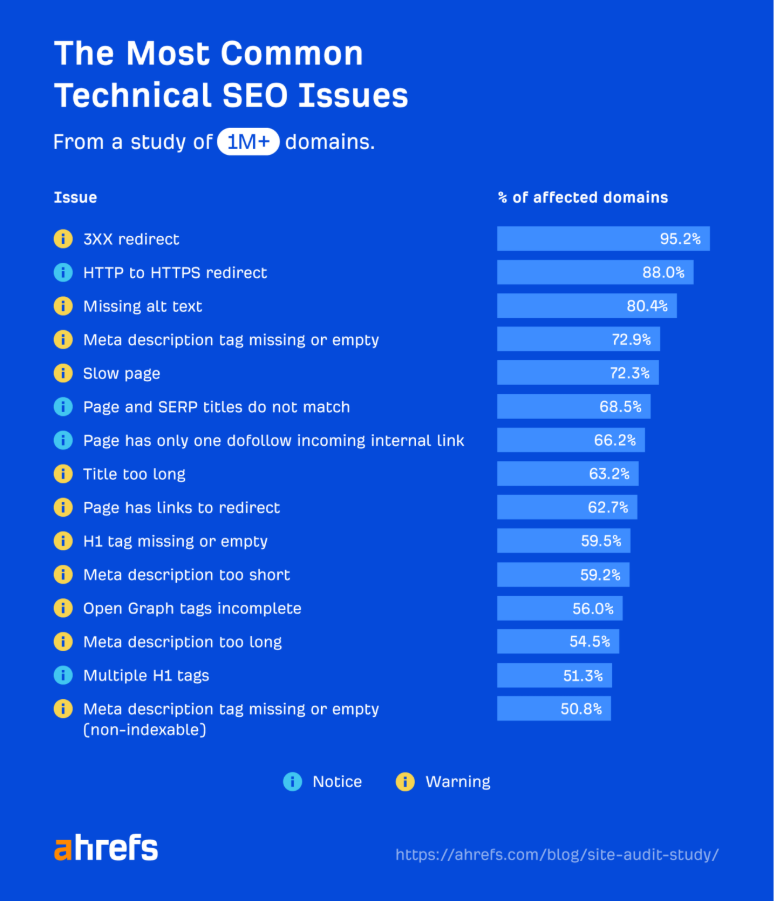
Crawling matters more today than it used to. According to Ahrefs, 95.2% of websites have 3XX redirect issues — a sign of just how easily technical problems slip past unnoticed without regular audits. That makes catching hidden issues early even more important — which is exactly where a strong crawler earns its keep.
Key Features and Functionalities
Deepcrawl propels the organizational website optimization processes with its extensive functions by applying advanced options. Here’s a closer look at what Deepcrawl actually does once it’s pointed at your site.
1. Website Crawling Capabilities
Deepcrawl’s website crawling is where the platform stands out. It rigorously crawls websites, indexes pages, and identifies hidden SEO issues — at scale, whether the site is mid-sized or enormous.
The crawler is built to scan over 10 million URLs in a single session, which has earned the trust of large sites and Fortune 500 companies. Back in 2017, DeepCrawl notably crawled over 3 billion URLs across 400,000+ crawls — an early demonstration of its capacity that still shapes its reputation for handling enterprise-scale sites today.
2. Analysis of Technical SEO Issues
Deepcrawl has an edge in finding and diagnosing many technical SEO problems that affect search rankings — broken links, redirects, and duplication among them. That’s a lot more than it seems: research indicates that at least 66.5% of links to sites die within nine years, so most sites are unknowingly accumulating broken links and redirect chains that are only discovered during a scan.
3. Reporting and Visualization Options
Data visualization is a key part of SEO, since it makes complex crawl data easier to interpret. Deepcrawl’s reporting tools let users track progress over time and share insights with stakeholders through customizable report templates.
4. Integrations and Automation
Deepcrawl integrates with Google Analytics, Google Search Console, and key CMS platforms, making it easy to view crawl data alongside traffic and ranking data in the same place.
Scheduled crawls are configured to run regularly on a defined schedule, meaning that teams don’t have to rely on remembering to trigger an audit before product launch or site migrations. API access allows larger teams to take crawl results and import them into their own dashboard instead of manually exporting the results.
Like any tool, Deepcrawl has real strengths and a few trade-offs worth knowing before you commit to it.
Pros and Cons of Using Deepcrawl
Pros:
- Comprehensive Crawling: Deepcrawl’s crawling of extensive and intricate websites gives an all-inclusive view, making it possible to monitor a wide variety of SEO issues.
- In-depth Analysis: The tool gives detailed views into core technical SEO problems, enabling data-based decisions and prioritized fixes.
- Scalability: Whether it’s a single website or a multi-project portfolio, Deepcrawl scales with the business.
- Customizable Reporting: Reports can be tailored to specific stakeholder needs.
Cons:
- Learning Curve: The depth of functionality takes time to master, especially for beginners.
- Cost: Pricing flexibility exists, but it can still be out of reach for smaller businesses or individuals with tight budgets.
- Dependency on External Factors: Crawl reliability can be affected by website downtime or server issues outside the tool’s control.
Cost
Contact the support team for a customized package based on your site size and needs.
Exploring Screaming Frog
screamingfrog.co.uk/seo-spider/
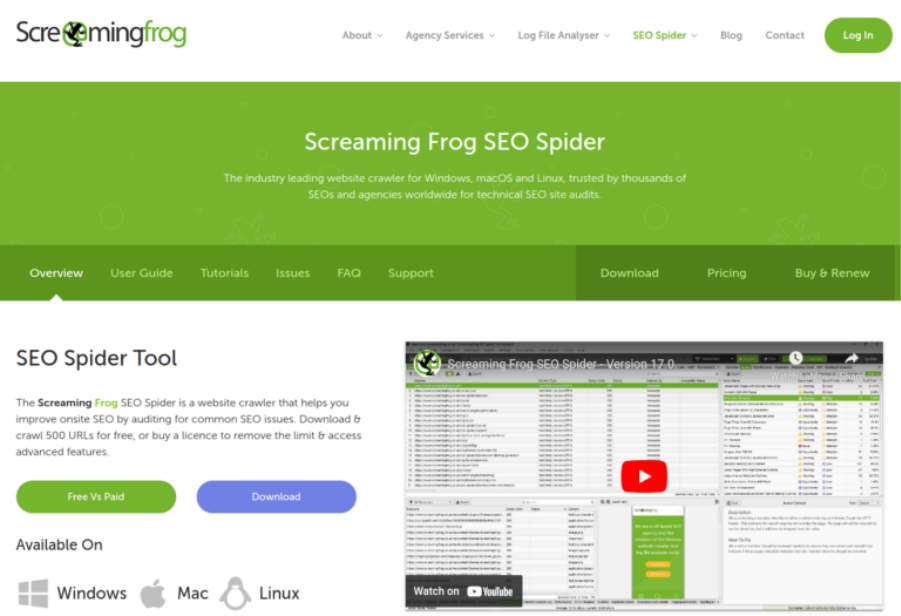
One of the most well-known crawlers in SEO is Screaming Frog. Launched in 2010, it was quickly adopted by digital marketers for its detailed reporting on on-page SEO elements.
It’s a desktop-based application: users crawl websites and analyze title tags, meta descriptions, heading structure, internal linking, and more. Screaming Frog remains one of the most frequently used tools for finding SEO issues and improving search visibility.
Key Features and Functionalities
Let us examine the multi-faceted capabilities of Screaming Frog, a search engine optimization tool well known to be powerful in matters of site crawling, on-page analysis, and data extraction.
1. Website Crawling Capabilities
At the heart of Screaming Frog’s functionality is its website crawling engine. It traverses and indexes websites with remarkable efficiency, giving users thorough coverage to catch issues that could affect rankings.
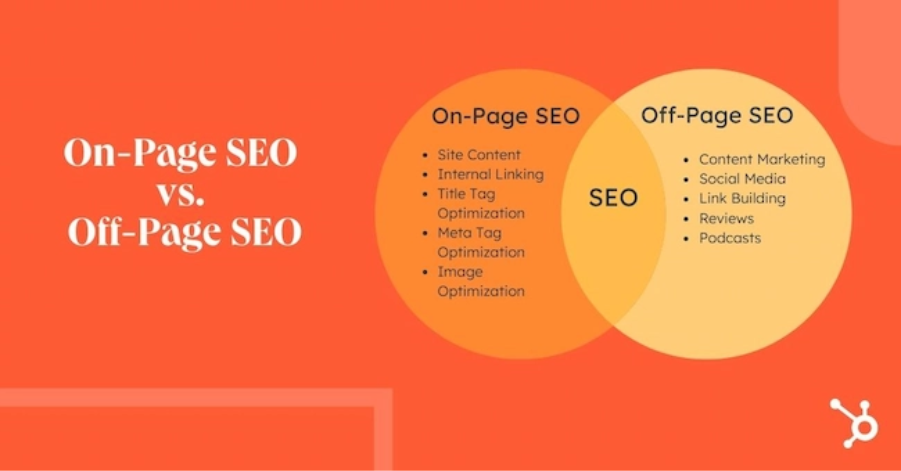
2. Analysis of On-page SEO Elements
hubspot.com
Screaming Frog excels at analyzing on-page SEO elements — title tags, meta descriptions, heading structure, and internal linking — with clear recommendations for optimization.
3. Custom Extraction and Data Analysis
In addition to crawling and on-page analysis, Screaming Frog provides advanced custom extraction with XPath, CSS Path, or regex. You can extract structured data markup, canonical tags, and schema.org markup directly from the crawl, without having to manually open every page. This allows for easy auditing of hundreds of pages in just a few minutes for one missing tag.
4. Integrations and Automation
Screaming Frog integrates with Google Analytics, Google Search Console, and PageSpeed Insights, and adds that data to the same crawl report. Crawls can run automatically, and results can be saved, compared, and exported for client reporting. There’s also a command-line interface, which agencies utilize to automate frequent audits for numerous client locations simultaneously.
Screaming Frog has plenty of fans, but it’s not perfect. Here’s the full picture, good and bad.
Pros and Cons of Using Screaming Frog
Pros:
- Comprehensive Website Crawling: With fast crawling, regular checks of websites become feasible, and issues can be identified in a timely manner.
- Detailed On-page Analysis: In-depth on-page data for better optimization decisions.
- Custom Extraction and Data Analysis: Advanced extraction rules provide flexibility for extracting just the data you need.
- Regular Updates and Support: The Screaming Frog team publishes new features on a regular basis and answers support inquiries promptly.
Cons:
- Steep Learning Curve: The sheer number of features can overwhelm new users.
- Limited Free Version: The free level is limited to 500 URLs – suitable for spot-checks, but not full site audits.
- Resource Intensive: Lower spec machines may end up being strained by large crawls, as the processing takes place on the machine and not in the cloud.
Cost
- Free Version (up to 500 URLs)
- Paid Version: $279 per year per license (unlimited crawls, JavaScript rendering, and API integrations)
Head-to-Head Comparison

magnific.com
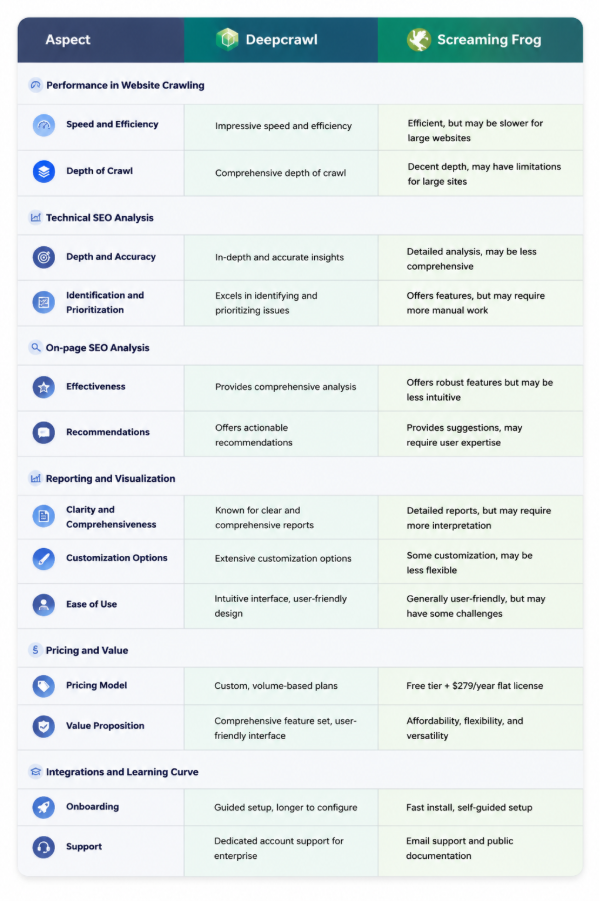
Let’s take a closer look at Deepcrawl vs Screaming Frog for each functional and performance factor that counts.
1. Performance in Website Crawling
Speed and Efficiency
- Deepcrawl: With its cloud-based infrastructure, Deepcrawl processes data rapidly with minimal downtime, allowing users to audit large and complex sites without delay.
- Screaming Frog: Very efficient on most sites, but it’s a desktop tool which, as such, may slow down the performance on very large sites — the more pages you have, the slower the crawl and the more processing you’ll need locally.
Depth of Crawl
- Deepcrawl: Built to surface issues that many audit tools miss, with detailed audits spanning every page of the site.
- Screaming Frog: Can also perform deep crawls, but the desktop-based design may not be able to crawl to the depth of very large sites, sometimes missing content or pages.
2. Technical SEO Analysis

magnific.com
Depth and Accuracy of Technical SEO Insights
- Deepcrawl: Digs deep and gets it right. It spots broken links, bad redirects, duplicate page problems, and hreflang mix-ups, then breaks it all down so you know exactly what’s putting your rankings at risk.
- Screaming Frog: Covers the same basics well too — broken links, redirects, duplicate content. But some users say it doesn’t dig quite as deep when things get more complicated.
To give perspective, here’s how deep “comprehensive” is in this context: some of the best audit solutions have over 140 automated checks, ranging from crawling to HTTPS to page speed and internal linking. When claiming to be thorough, that’s a fair bar to hold any crawler against.
Identification and Prioritization of Issues
- Deepcrawl: Good at finding problems and telling you what to fix first. Its reports are automated and easy to customize, so the important stuff doesn’t get buried.
- Screaming Frog: You can sort and filter issues by how serious they are, but you’ll be doing more of that sorting yourself. Deepcrawl handles more of it for you.
3. On-page SEO Analysis

magnific.com
Effectiveness in Analyzing On-page Elements
- Deepcrawl: Provides extensive information on title tags, meta descriptions, heading structure, and internal linking, and provides data visualization where optimization opportunities are easily noticed.
- Screaming Frog: Provides a large number of on-page tools, but the on-page analysis process doesn’t seem as intuitive as the Deepcrawl interface and reporting.
Recommendations for Optimization
- Deepcrawl: Provides practical, best-practice-aligned recommendations, with customizable reports to prioritize fixes.
- Screaming Frog: Surfaces optimization opportunities based on SEO best practices, but interpreting the data and acting on it often relies more on user expertise.
4. Reporting and Visualization

magnific.com
Clarity and Comprehensiveness of Reports
- Deepcrawl: Reports are comprehensive and also user-friendly, and there are customization features which enable teams to create a report around their needs.
- Screaming Frog: Also generates in-depth reports, but some users say that they are less detailed than Deepcrawl’s and more time-consuming to analyze and take action on.
Customization Options and Ease of Use
- Deepcrawl: Designed for intuitive navigation through data and reports, with strong customization.
- Screaming Frog: Offers some customization, generally less flexible than Deepcrawl’s. The interface is generally intuitive, with potential complexities in report building for more sophisticated websites.
5. Pricing and Value

magnific.com
Comparison of Pricing Models
- Deepcrawl: Provides flexibility and scalability with monthly or annual plans that are priced according to the number of pages being crawled and the features included.
- Screaming Frog: There is a simple free version and a paid version that costs $279 per year, with no monthly usage fees or credits per crawl. For smaller teams, that flat-fee pricing model can be more predictable than the usage-based cloud pricing model.
Value Proposition Offered by Each Tool
- Deepcrawl: The value is in its feature depth, sophisticated capabilities, and intuitive interface — a strong pick for companies wanting a robust, cloud-based SEO solution.
- Screaming Frog: It’s about flexibility, affordability, and adaptability. It is not as comprehensive as Deepcrawl’s, but you’ll find that it provides you with truly helpful and actionable information that you can use to make your website more efficient and more visible to search engines.
Backlinko.com
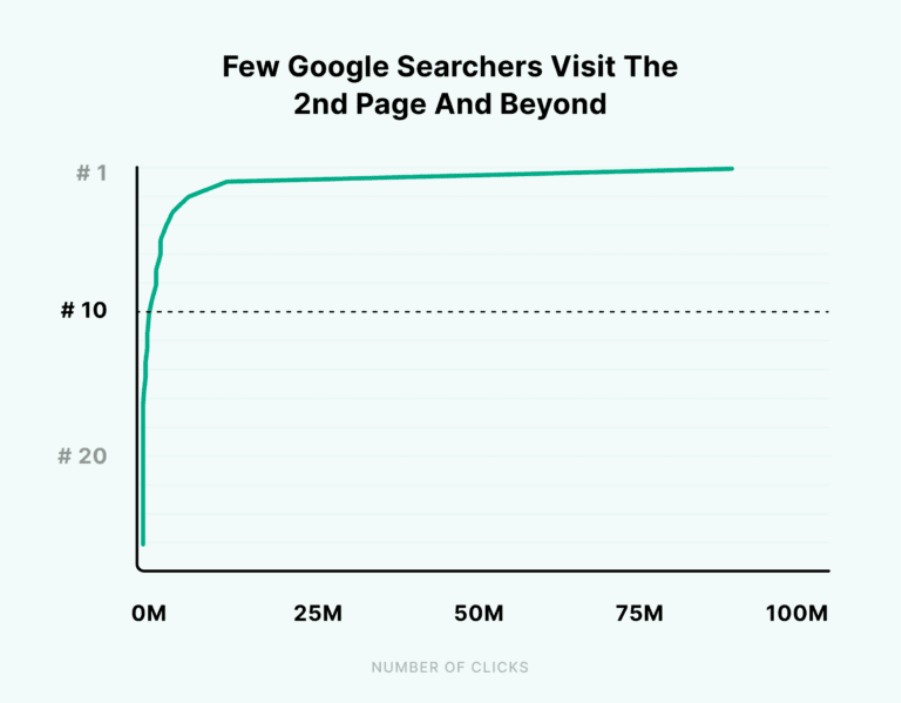
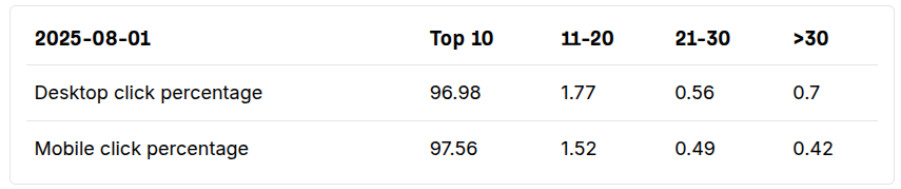
Worth keeping in mind while weighing either investment: rankings don’t forgive technical debt. Only 0.63% of searchers ever click through to page two of results, and almost 97% of all clicks go to the top 10 — which is exactly the territory both tools are designed to help you hold onto.
Ahrefs.com
6. Integrations, Support, and Learning Curve
Getting Started
- Deepcrawl: Onboarding typically involves a setup call with the Lumar team as the crawl settings are tailored to reflect the site structure of each account. Although this handholding is helpful for larger teams, it does take longer than simply adding an app to get started.
- Screaming Frog: Downloads and installs just like desktop software and can begin crawling in minutes. The downside is that new users are left to figure out the settings and reports, for the most part, by themselves.
Support and Documentation
- Deepcrawl: Enterprise accounts are usually offered to larger teams that have multiple sites and are able to have a dedicated account manager and support access.
- Screaming Frog: Provides email support, a comprehensive public knowledge base, and a vibrant user community to assist in resolving common problems.
Which SEO Tool Reigns Supreme: Deepcrawl or Screaming Frog?
Choosing between Deepcrawl and Screaming Frog comes down to a few clear differences. Deepcrawl runs in the cloud, built for fast, comprehensive crawls paired with deep technical SEO analysis. Screaming Frog runs locally, delivering strong on-page and technical insight at a lower price, with the trade-offs that come from being desktop-based.
That trade-off matters more now than it did a few years ago. A recent Ahrefs study found that AI Overviews cut clicks to the top organic result by 58%. That means the room for technical error has shrunk, since every broken link or crawl gap is now fighting for a smaller pool of clicks.
The right pick usually comes down to who is doing the work. A freelancer or small agency managing a handful of sites can get everything they need from Screaming Frog’s flat annual fee, since it covers checks without a recurring cloud bill. A larger in-house team, or an agency running scheduled audits across dozens of properties, tends to get more value from Deepcrawl’s automated workflow. Ecommerce sites with frequent catalog changes also benefit from tracking crawl data over time, since spotting a spike in broken links early can prevent a bigger ranking problem later.
Choose the Right SEO Tool
In the complex web of digital optimization, the debate between Deepcrawl and Screaming Frog comes down to two genuinely different tools built for different situations. Deepcrawl brings cloud-based scale that handles websites of any size without hindrance. Screaming Frog brings desktop-based flexibility and affordability that suits a broad range of users, from freelancers to agencies.
The right answer isn’t a blanket declaration of superiority — it depends on the features that align with your site’s size, budget, and workflow. Like any craftsperson choosing the right tool for the job, SEO professionals need to match the crawler to the objective, especially now that technical cleanliness has a direct line to how much of the shrinking organic-click pie a site actually gets to keep.
For most freelancers and small agencies, Screaming Frog’s low upfront cost and fast setup make it the practical starting point. For enterprise teams managing large, complex sites, Deepcrawl’s automation and reporting depth are usually worth the higher price tag.
Frequently Asked Questions
1. Is Screaming Frog free to use?
Yes. Screaming Frog offers a free version that crawls up to 500 URLs per site, which covers basic audits and spot-checks. Removing the crawl limit and unlocking features like JavaScript rendering and scheduling requires the paid license. The free version is also a good way to test the tool on a smaller project before deciding whether the paid license is worth it.
2. Can Screaming Frog handle websites with millions of pages?
Technically yes, but it depends on the machine running it. Because Screaming Frog stores crawl data locally, very large crawls need plenty of RAM and disk space, and performance can slow down well before a cloud-based tool like Lumar would struggle. A database storage mode helps with bigger sites, but enterprise teams often find Lumar’s cloud infrastructure easier to scale.
3. Which tool is better for small websites versus enterprise sites?
Screaming Frog tends to suit smaller sites, freelancers, and agencies working within a fixed budget, thanks to its flat annual fee and desktop simplicity. Deepcrawl (Lumar) is generally a better fit for enterprise or very large sites that need cloud-scale crawling and volume-based pricing. Budget and site size are usually the deciding factors, more than any single feature.
4. Can Screaming Frog and Deepcrawl/Lumar be used together?
Yes, and many agencies do. Screaming Frog is often used for quick, ad hoc crawls and granular on-page checks, while Deepcrawl/Lumar handles ongoing, large-scale monitoring and enterprise reporting. Running both gives teams fast, ad hoc checks alongside deeper, scheduled monitoring, without relying on a single tool to do everything.
5. How much does Screaming Frog cost in 2026?
Screaming Frog’s paid license is $279 per year (£199 / €245) per user, covering unlimited crawls. A free tier is also available with a 500-URL crawl cap. Volume discounts are available for agencies buying multiple licenses at once, which can lower the per-seat cost for larger teams.
6. How often should a website be crawled with these tools?
Most sites benefit from a full crawl at least monthly, with more frequent checks around big changes like a redesign, migration, or large content push. Ecommerce sites with fast-changing catalogs often crawl weekly. Scheduled, automated crawls — a feature both tools support — make it easier to catch new issues before they affect rankings.


