
In the evolving digital landscape, backlinks are essential for connectivity and influence. They act as the virtual pathways that direct the audience to your website. Enter Google Analytics 4 – a robust analytical tool that plays the role of a vigilant guardian overseeing this complex virtual network.
The popularity of Google Analytics 4 has risen significantly, with approximately 8.4 million websites using it as of March 2023. In this blog, we will dive into an exciting journey of checking backlinks in Google Analytics 4. By carefully going through data and insightful metrics, we will explore the world of digital references, unveiling the methods to harness the power of backlinks.
Get ready to explore the heart of digital intricacies and master the art of online influence.
Understanding Backlinks
Backlinks, or incoming links, one-way links, or inbound links, are links on a website that point to another website via anchor text. Google views these backlinks as votes of confidence, indicating authority, relevancy, and quality to the web page.
According to Search Engine Land, backlinks are considered the top 2 factors that Google’s page ranking algorithm considers. 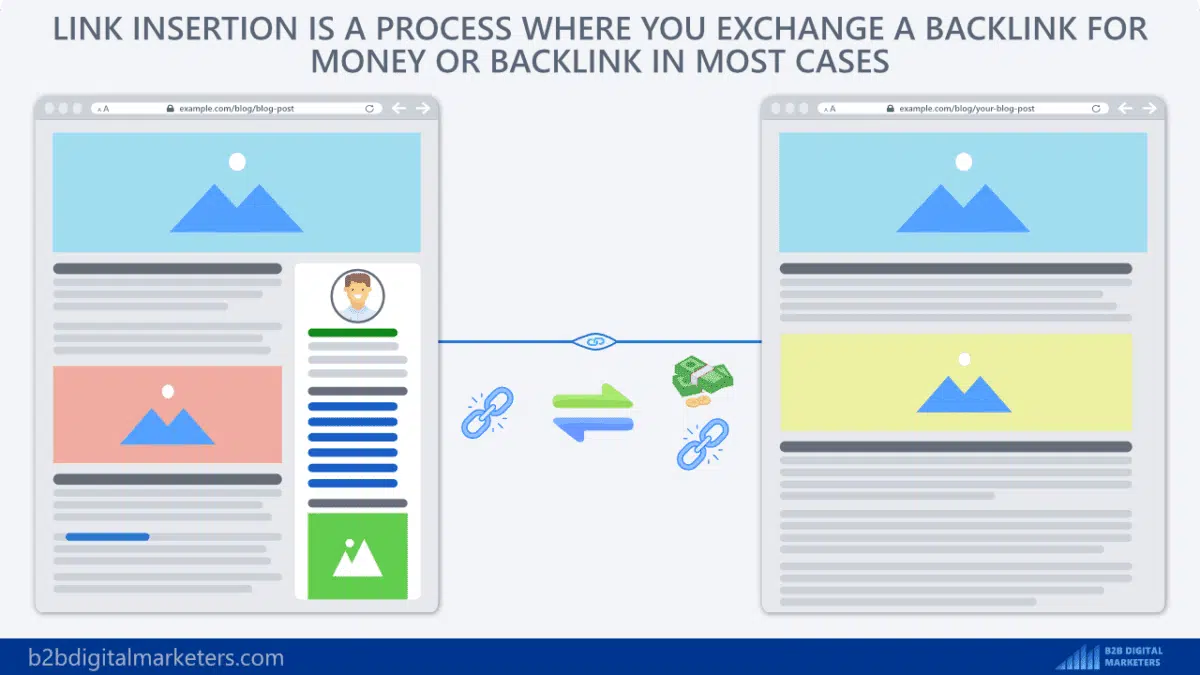
As per the study by Backlinko (refer to the data above), the top-ranking pages on Google search results consist of more backlinks than those ranking lower.
Importance of Backlinks
Backlinks have a significant impact on shaping your online presence. Their importance lies in the following:
- Boosting Website Authority and Credibility: Search engines view backlinks as virtual endorsements, indicating the value and reliability of your content. Websites with more high-quality backlinks frequently command higher authority and credibility in their niche.
- Improve Search Engine Rankings: Backlinks are crucial in determining your website’s SEO success. Your website will increase in the SERPs as the more high-domain authority websites link to it.
- Increase Organic Traffic: Backlinks are pathways driving relevant users to your website. Each backlink is an opportunity to reach out to new audiences and grow your organic traffic, contributing to the brand’s visibility and development.
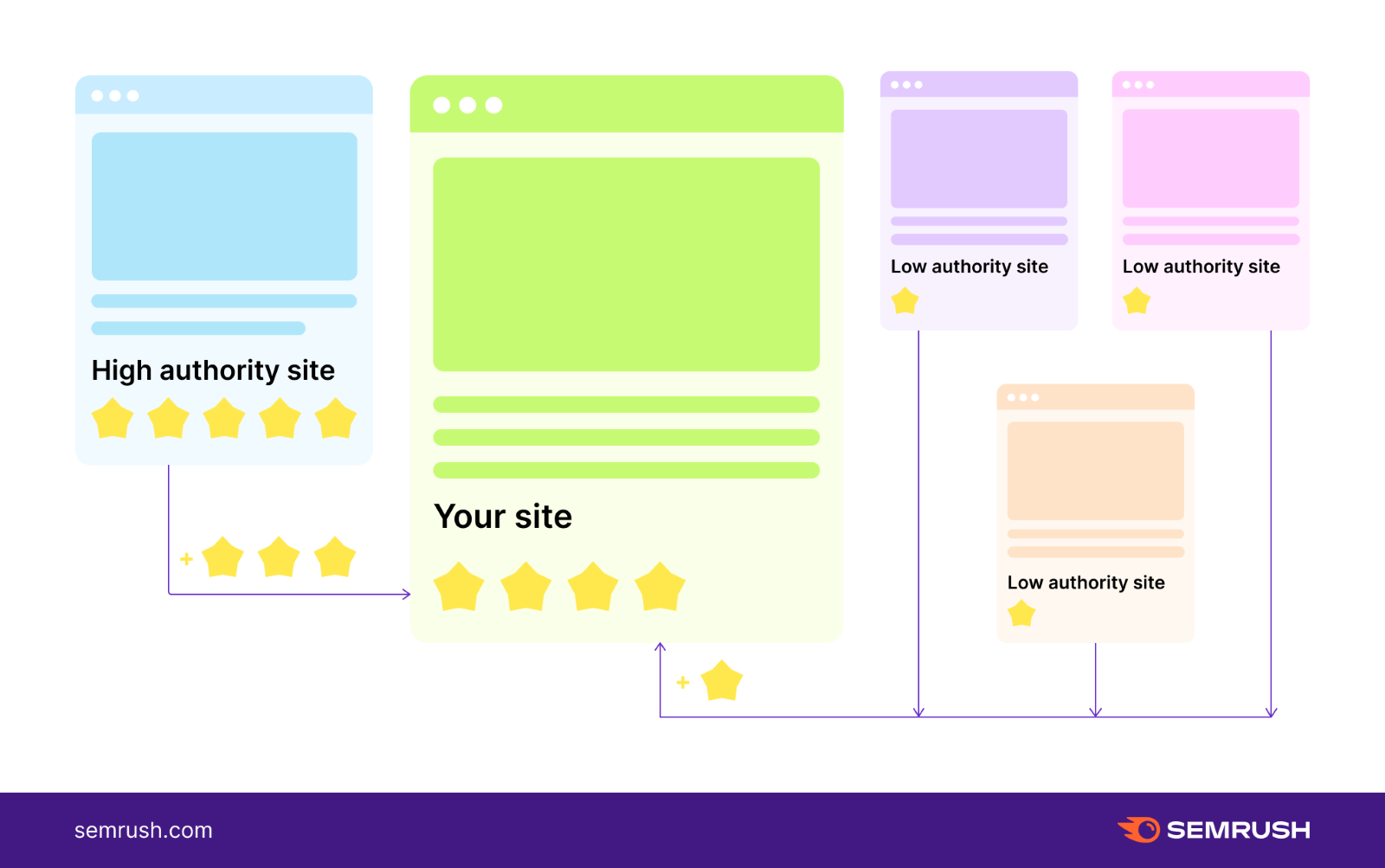
The above picture showcases that you can acquire tons of backlinks from low-authority websites but remember that they won’t positively impact your websites. In fact, it might get you penalized by Google. Therefore, focus on gaining high-quality backlinks from relevant and valuable websites to take your website to new heights.
Google Analytics 4: An Overview
Let’s understand the world of Google Analytics 4 and uncover the secrets of decoding your digital success.
Introduction to Google Analytics 4
Say hello to your website’s new best friend: Google Analytics 4! Imagine Google Analytics 4 as your website’s personal detective, spilling the beans on what your visitors are up to.
It’s similar to a treasure map directing you to valuable insights about where your audience is coming from, what they’re browsing, and how to enhance their experience. Google Analytics 4 was launched as the next evolution of Google’s analytics platform on October 2020.
This analytical platform aimed to provide a more user-centric and comprehensive approach to data analysis, in line with the rapidly changing digital landscape and privacy regulations. The introduction of GA4 marked a shift towards event-based tracking, AI-powered insights, and improved cross-device tracking.
Google Analytics 4 provides a clear and concise report to help you understand your audience and up your website game. 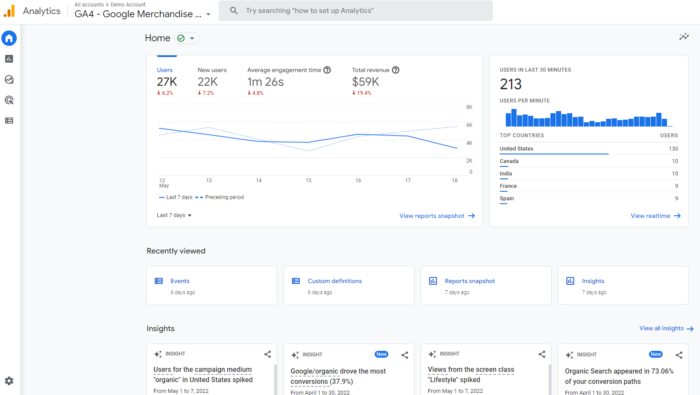 Image Source
The above picture shows the dashboard of Google Analytics 4. On the right, there is a navigation bar that includes the home, explore, configure, reports, library, and advertising sections. You can see predictive insights based on Google AI, under Insights, at the bottom of the page.
Key Features and Advantages
Google Analytics 4 is loaded with game-changing features and advantages that can supercharge your digital strategy:
Key Features

- Enhanced Event Tracking: Google Analytics 4 tracks every tap, click, and swipe the audience make on your website. This help you to identify any new patterns in how people use your website.
- Real-Time Insights: GA4 keeps you updated about what is going on by providing all the live updates of the action on your site.
- Predictive Metrics: Like a crystal ball, Google Analytics 4 can predict what the audience might do next. It helps in keeping you at the forefront of the digital marketing industry.
- Cross-Device Tracking: Google Analytics 4 tracks people on their smartphones, computers, laptops, and tablets for you to know their entire journey.
Advantages
- Smarter Decision-Making: The precise tracking of events on Google Analytics 4 allows you to get clever ideas for better backlinking strategy. This makes your website better and helps keep people engaged.
- Immediate Adaptability: Real-time data allows you to quickly change your strategy based on what your audience like and does. It’s like fixing your gaming tactics while the match is still on.
- Future-Proofing: Just like predicting the weather, GA4 lets you see what’s about to come in the digital world. This helps you stay cool during the changing digital landscape.
- Holistic View: Keep an eye on people on all their devices to understand their interests. This helps you provide products or services as per their preferences.
Setting Up Google Analytics 4 for Backlink Tracking
Understanding the impact of virtual referrals requires setting up backlink tracking with Google Analytics 4. These instructions will help you set up your tracking compass so you can navigate the digital environment with confidence.
A. Creating a Google Analytics 4 Property
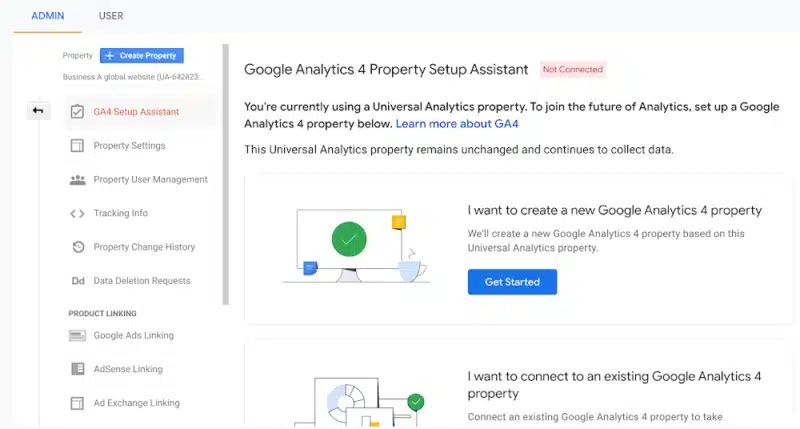
To begin your data journey, set up a Google Analytics 4 (GA4) property by performing the steps listed below:
- Sign into your Google Analytics account or register for a new one.
- Head to the “Admin” section, your gateway to managing analytics configurations.
- Choose the target account and property where you want to establish GA4.
- Click “Create Property,” select the “Web” option, and enter your website’s details.
- Follow the guided prompts to complete the GA4 property setup.
B. Setting Up Goals for Backlink Tracking
Boost your backlink insights game in Google Analytics 4 by setting up goals that align with your tracking objects. Here’s the roadmap:
- Within your GA4 property, find and click on the “Goals” section.
- Select the “New Goal” button to kickstart the goal-creation process.
- Choose a goal template that matches your backlink aspirations – like “Engagement” or “Acquisition.”
- Personalize the goal details, such as defining specific event triggers or pinpointing destination URLs.
- Save your goal settings and activate them to begin tracking your backlink-driven successes.
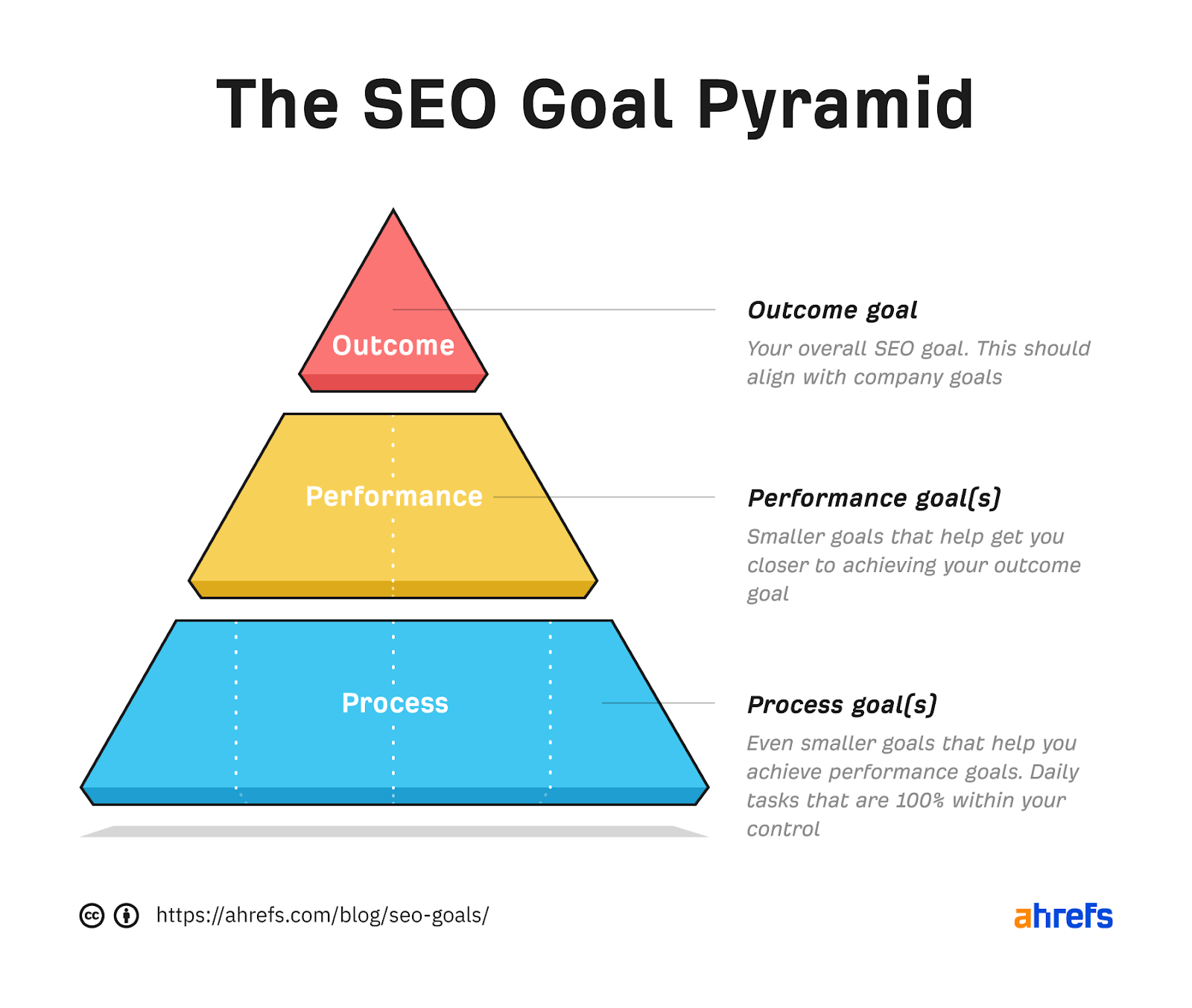
In the above picture, you can see the SEO goal pyramid, which helps you set up goals for your link-building strategy. You can use this in the following way:
- Outcome: Describe the goals you hope to accomplish and set the timeframe for the same.
- Performance: In this step, break these down into smaller goals for you to achieve your ultimate target.
- Process: These are daily tasks, 100% within your control, that help you achieve the target in the long run.
The strategy is to divide things into smaller steps so you can easily achieve your bigger goals. When you finish the process goals, you’re getting closer to reaching your performance goals. And when you achieve performance goals, you’re on your way to hitting the ultimate outcome goal.
C. Configuring Events and UTM (Urchin Tracking Module) Parameters
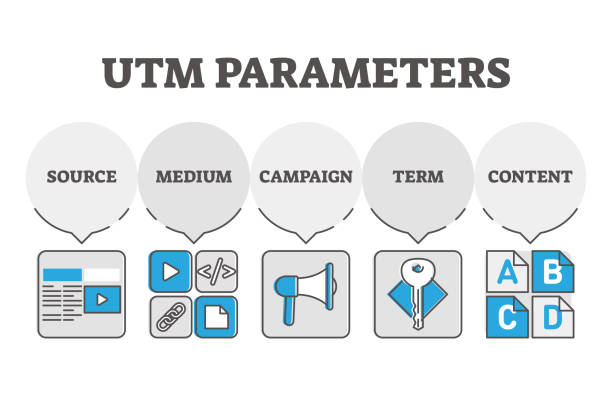
The strategic configuration of events and UTM parameters in Google Analytics 4 is your best instrument for recognizing the full potential of backlink impact. Here’s how:
- Go to the “Events” section in GA4 to see how people are interacting with your backlinks.
- Implement UTM parameters to your backlinks, including essential details like source, medium, and campaign.
- Regularly monitor the “Events” report to gain insights into user actions stemming from your backlinks.
How to check backlinks in google analytics 4?
Tracking backlinks is similar to following a trail of breadcrumbs that will help you get deeper insights. Google Analytics 4 help you understand the way the audience moves through your backlinks. To efficiently track backlinks using Google Analytics 4, follow the steps listed below:
1. Access Your GA4 Property
Once log into your Google Analytics 4 account, you can easily choose the particular property you would like to explore. You can examine how your website and backlinks are performing, much like you would in a digital control room. You can find useful information that can help you make wise decisions and improve your web presence with only a few clicks.
2. Utilize Event Tracking

You can explore the treasure of information by entering the “Events” section within the “Reports” tab of Google Analytics 4. Here, you have the capability to create personalized events that vividly capture the moments when people click on your backlinks.
These custom events in your toolkit provide detailed insights into what your visitors are up to, helping you understand their journey through your website. It is similar to having a backstage pass to watch and analyze how your backlinks shine and shape your digital strategy.
3. Incorporate UTM Parameters
These nifty tags added to your backlink URLs are like digital detectives, ensuring accurate tracking in Google Analytics 4. Think of them as tiny maps that guide you through the online wilderness. When you put UTM tags on your backlinks, like source (where the link comes from), medium (what kind of link it is), and campaign (why you’re using it), you’re giving each link its own identity card. 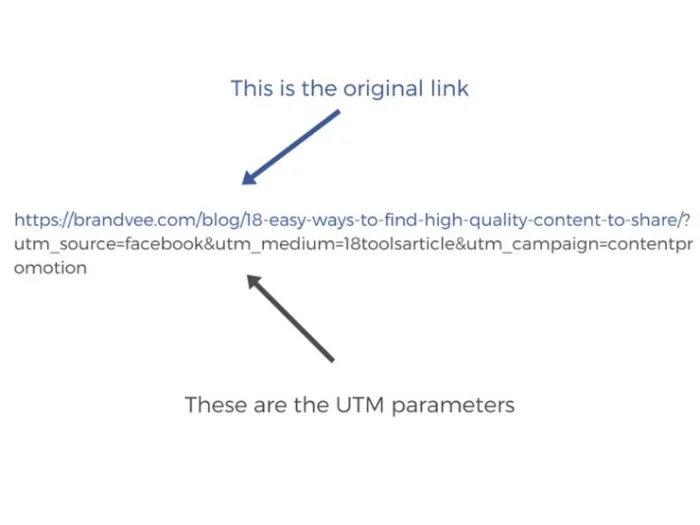 Image Source
Here’s an example of how UTM parameters appear in your URL. The original link is “https://brandvee.com/blog/18-easy-ways-to-find-high-quality-content-to-share/?” and UTM parameters include the following part of the URL, “utm_source=facebook&utm_medium=18toolsarticle&utm_campaign=contentpromotion”.
This helps GA4 trace and reveal the journey of the audience who click on those backlinks, depicting which sources attract traffic, which is the most effective link, and what campaigns are running successfully.
4. Craft UTM-Tagged Backlinks
You can enhance your backlink tracking game by crafting UTM-tagged backlinks in Google Analytics 4. For example, by adding UTM tags, such as the source, medium, and campaign, a regular URL like ‘www.outreachcrayon.com/page/’ transforms into a smarter version ‘www.outreachcrayon.com/page/utm_source=referrer&utm_medium=backlink&utm_campaign=specialoffer.’
This labeling enables Google Analytics 4 to track the path of each backlink and uncover how they contribute to or impact your website’s traffic and success.
5. Analyze Event Reports

You must keep an eye on the “Events” report in Google Analytics 4 to see how folks use your backlinks. This report acts as a window that shows you how people interact with your backlinks.
Dig deeper to discover valuable details like click-through rates (how many times links are clicked), referral sources (where the audience comes from), and user behavior insights (the action they perform after clicking).
By analyzing these event reports, you can unlock the wealth of knowledge that assists you in optimizing your backlink strategy, helping you make smart choices to boost your website performance and engagement.
6. Measure Conversions and Goals
Create specific goals linked to actions driven by backlinks in Google Analytics 4. Think of it as making a to-do list for tasks like filling out forms or making purchases. Then, keep a watchful eye on how many of these goals you actually complete – it’s like counting your successful missions. 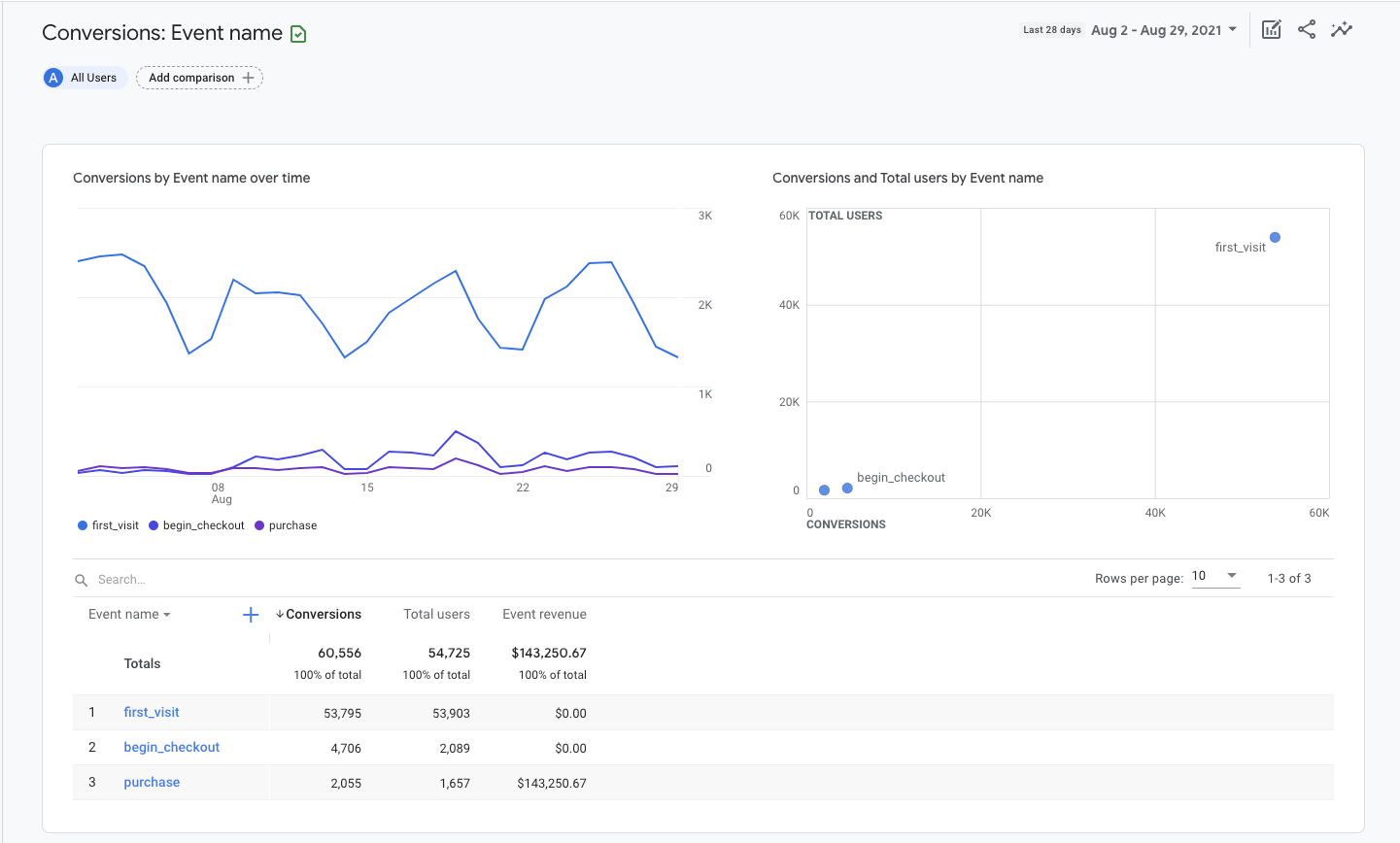 Image Source
The report above showcases the list of goals set by a website and its conversion report. You can click on the name of any event to check the report and analyze the data. This process helps you see how well your backlinks are performing in getting the results you desire.
It’s similar to checking off items on your list and analyzing if your backlinks are effective in bringing about the outcomes you aimed for. This data-driven insight helps you refine your strategies for maximum impact.
7. Optimize and Iterate
You must regularly monitor how your backlinks are performing in Google Analytics 4. Use the information you have collected to make your link-building strategy even better. You can identify the sources which are sending the most traffic and come up with better ways to get people interested and engaged. By doing this consistently, you make sure more people visit your website, and your backlinks become super effective.
Conclusion
Understanding the art of tracking backlinks using Google Analytics 4 is vital for any business. You hold the keys to unlocking the treasure of information if you have a thorough grasp of event tracking, UTM parameters, and goal optimization.
This journey equips you to analyze user behavior, hone your strategies, and enhance your online presence. Google Analytics 4 turns data into a roadmap that helps you discover the impact of each click and the importance of every interaction. By using its power, you embark on a consistent journey of improvement, ensuring your backlinks navigate the digital currents with precision and purpose.

About the author: Vibhav Gaur, Business Head
Vibhav Gaur leads strategic operations and business growth at the organization. With a strong background in digital transformation and customer-focused solutions, he has helped numerous clients streamline their web presence and scale efficiently. His leadership ensures seamless execution across teams, with a commitment to delivering results and fostering innovation in every project.


