
magnific.com
Key Takeaways
- Use clear, descriptive URLs to help users understand your pages and make your website easier to organize and navigate.
- Keep URLs concise and descriptive rather than targeting a specific character count. Research has found a correlation between shorter URLs and higher rankings, but URL length alone does not determine rankings.
- Use lowercase letters, hyphens, and relevant words where they fit naturally. Avoid keyword stuffing and unnecessary URL parameters.
- Keep your URL structure consistent across categories, subcategories, product pages, and article pages.
- When you change a URL, use a 301 redirect from the old URL to the new one, update internal links, and use canonical tags when multiple URLs contain the same or very similar content.
What if we told you that there is a secret portal to SEO success hiding in plain sight on your website?
It’s something much simpler: your URL structure. It’s a hero that’s frequently disregarded, yet it can play an important role in your SEO efforts. A clean, logical structure does more than tidy up your address bar — it helps crawlers understand your site and gives searchers a clearer path to your content.
But wait, weren’t we talking about SEO-friendly URL structures? Calm down; they’re up next.
Similar to a well-designed map that points to hidden gems, an SEO-friendly URL can easily direct readers and search engines to your content. With thoughtful URL planning, site owners can create clear paths through their websites and make each page easier to understand.
Search visibility plays an important role in attracting visitors, with 75% of searchers never going past the first page of search results. A well-planned URL structure gives your pages another layer of clarity when they appear in search results and helps create a more consistent experience across your website.
Now we know you’re curious like never before and want to be among the people who plan their URLs on purpose. So, are you ready to use the power of structuring URLs to support your website’s rankings? Let us move forward, then.
Table of Contents
- What Are SEO-Friendly URLs?
- Why Are SEO-Friendly URLs Important?
- Characteristics of SEO-Friendly URLs
- Best Practices for Building Clean, Optimized URLs
- Common SEO URL Mistakes to Avoid
- Make Your URL Structure Work for SEO
- FAQs
What Are SEO-Friendly URLs?

magnific.com
First and foremost, let’s clarify what the term “SEO-friendly” actually implies in relation to URLs. When done well, a URL can function more like a signpost, helping both people and search engines understand where they are being led.
An SEO-friendly URL structure is short, specific, and gives a clear indication of what the page contains. It can also include relevant words that naturally describe the page, rather than relying on internal IDs or other elements that provide little context to the reader.
Here’s a quick example:
- Non-SEO-Friendly URL: https://example.com/article?id=12345
- SEO-Friendly URL: https://example.com/ultimate-guide-seo-friendly-urls
The second URL is significantly easier to read and contains terms such as “SEO-friendly” and “URL” that help users understand the page topic. This combination of clarity, relevance, and simplicity is a key part of an SEO-friendly URL structure.
A URL also travels with a page wherever the link is shared. When someone includes a page in an email, social media post, or another article, the URL may appear without the surrounding page title or description, making descriptive wording useful for giving readers additional context.
URL planning can also begin before a page is published. Choosing a clear slug and consistent naming pattern alongside your content planning can give your website a more organized structure as you add new pages over time.
Why Are SEO-Friendly URLs Important?
The structure of the URLs is counted among the initial attributes that both the search engine and the user look into when visiting a page. It has several essential roles in SEO.
- Improved Crawlability: Web crawlers or spiders that are used by search engines such as Google are responsible for visiting and crawling websites. If your SEO-friendly URL structure is well maintained and uncluttered, it can make it easier for search engines to understand and navigate your website.
- Better User Experience: Clear and descriptive URLs can help users understand what to expect when they follow a link. The structure of the URL gives the user useful context about the content they are about to view.
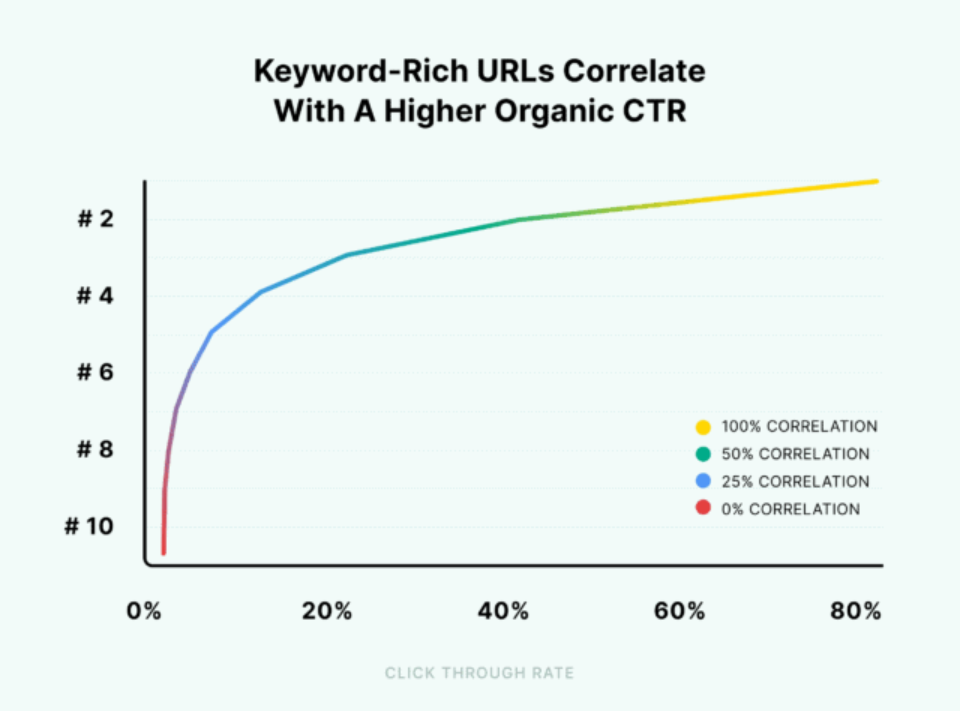
- Enhanced Click-Through Rates (CTR): Good and readable URLs that contain relevant terms can help users understand whether a search result matches what they are looking for.
backlinko.com
In fact, a study by Backlinko indicated that URLs that contain terms similar to a keyword have a 45% higher click-through rate than URLs that don’t contain a keyword. A higher CTR can bring more visitors to your site, although CTR alone does not determine search rankings.
- Keyword Relevance: Including relevant words in a URL can help users understand the page topic. However, keywords in URLs provide limited SEO value, so focus on making the URL clear and descriptive rather than adding keywords solely for rankings.
- Easier Site Management: Descriptive and consistent URLs can make website management, reporting, and site audits easier. Logical URL paths can help you identify page categories and organize sections of your website as it grows. They can also make it easier to group related pages in reports, review URL patterns during audits, and identify sections that may need updates as your site expands.
Characteristics of SEO-Friendly URLs
What, then, qualifies a URL as SEO-friendly?
The following are some essential traits.
1. Short and Simple
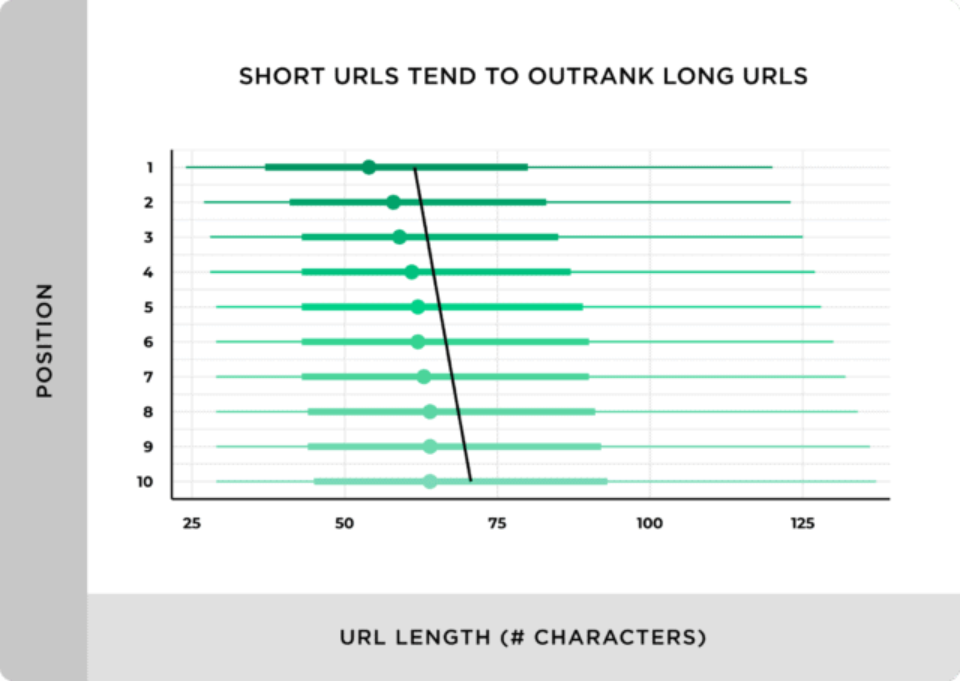
Google prefers shorter URLs because they rank higher in comparison to longer URLs.
backlinko.com
To back this up, a study by Backlinko found that short URLs tend to rank slightly better than long URLs.
They are more straightforward for users to comprehend and for search engine crawlers to interpret and follow. This means that URLs should be concise while still being descriptive.
- Example of an Ideal URL: https://example.com/best-hiking-boots
- Example of a Long URL: https://example.com/all-you-need-to-know-about-hiking-boots-including-features-reviews
The first URL is shorter and avoids unnecessary words, making it easier for both users and search engines to understand. At the same time, a concise URL should retain the words needed to clearly describe the page.
2. Keyword Usage
Including relevant words in your URL can help users understand what a page is about. Use your main topic or keyword when it fits naturally, but avoid adding keywords just for SEO.
- Good Example: https://example.com/seo-tips
- Bad Example: https://example.com/seo-tips-seo-guide-best-seo-practices
In the first example, “SEO tips” describes the page topic without making the URL look over-optimized.
3. Use Hyphens to Separate Words
Hyphens (-) are interpreted by search engines as spaces between the words. It is a commonly accepted SEO practice to use hyphens to separate words in the URL.
- Example of a Proper URL: https://example.com/seo-friendly-url-structure
- Example of a Bad URL: https://example.com/seofriendlyurlstructure
The use of hyphens makes the URL easily understandable by the user as well as the search engines.
4. Lowercase Letters
Another thing that you must remember is that lowercase letters should be used in URLs.
Use lowercase letters in your URLs to keep them consistent and avoid potential URL variations. On case-sensitive servers, uppercase and lowercase URLs can point to different pages, which may create duplicate or inconsistent URLs.
- Good Example: https://example.com/seo-best-practices
- Bad Example: https://example.com/SEO-Best-Practices
Using lowercase consistently keeps your URLs clear and helps maintain consistent internal linking across your website.
5. Avoid Special Characters
Keep your URLs simple by using clear, standard characters and limiting unnecessary special characters. Complex characters, spaces, and unnecessary parameters can make URLs harder to read, share, and manage.
- Good Example: https://example.com/how-to-make-pizza
- Bad Example: https://example.com/how%20to%20make%20pizza
Simple URLs with clear formatting are easier for users to read and manage.
6. Remove Unnecessary Words
Keep your URLs concise by removing words that do not add useful meaning. However, keep words that help make the URL clear and natural.
- Good Example: https://example.com/best-hiking-boots
- Bad Example: https://example.com/best-hiking-boots-for-men-and-women
The second URL is also understandable, but the shorter version is easier to read and still clearly describes the page.
Best Practices for Creating SEO-Friendly URL Structures
After learning the traits of SEO-friendly URLs, let’s examine some best practices to assist you in developing efficient URL structures for your website. Planning these elements early can also help you maintain a clear structure as you add new pages and content.
1. Use a Consistent URL Structure
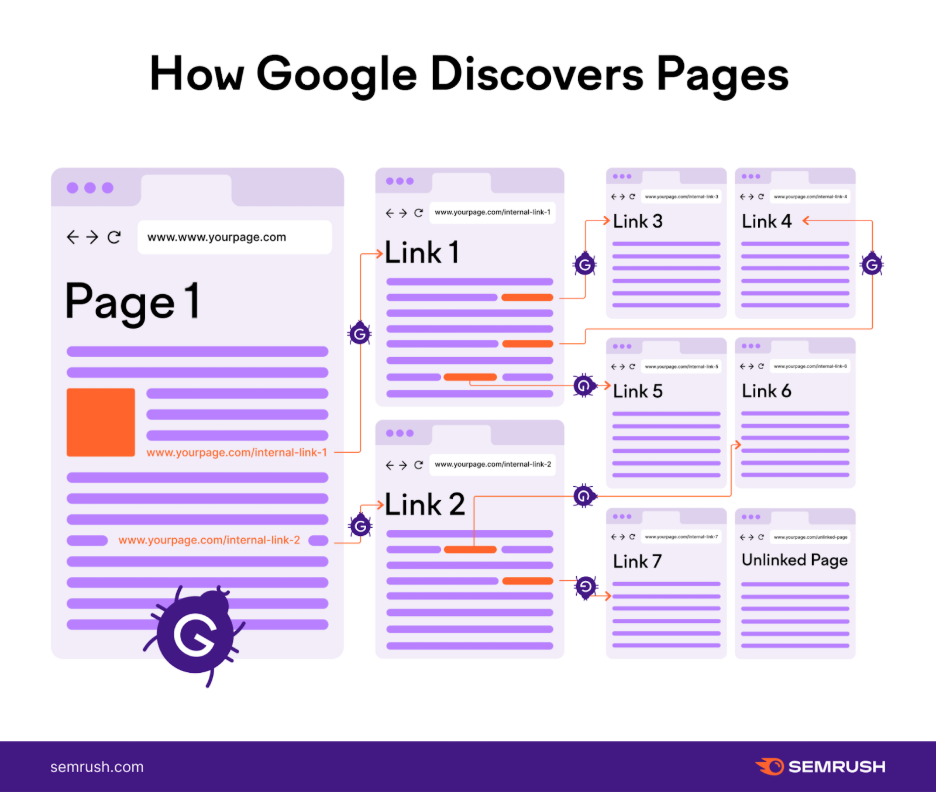
Maintaining a consistent URL structure throughout your website creates a predictable path for users and supports organized internal linking and effective link building, making it easier for search engines to discover and understand related pages.
semrush.com
Internal links can help search engines discover and crawl your website’s pages. A logical URL pattern also makes it easier for your team to identify where new pages belong and maintain the structure as the website grows.
An illustration of a consistent SEO-friendly URL structure may be seen here.
- Category Page: https://example.com/products
- Subcategory Page: https://example.com/products/shoes
- Product Page: https://example.com/products/shoes/running-shoes
Maintaining consistency makes your URLs more logical and user-friendly. It also gives you a repeatable pattern to follow when creating similar pages, which can simplify website management and future URL planning.
2. Keep Your URLs Concise
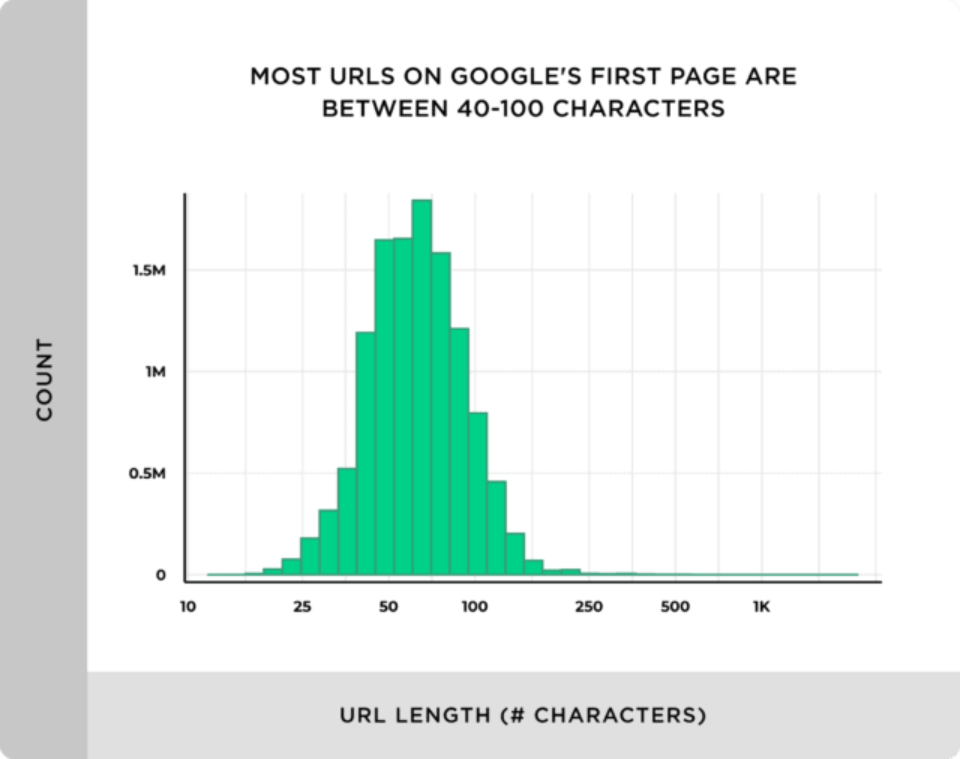
Although there isn’t a set length limit for URLs, keeping them concise can make them easier to read and understand.
backlinko.com
According to research by Backlinko, the average URL length for a Google top-10 result is 66 characters. However, there is no fixed URL length limit, so focus on keeping your URLs concise and descriptive.
- Good Example: https://example.com/seo-tools
- Too Long Example: https://example.com/a-complete-guide-to-the-best-seo-tools-you-can-use
Shortening the second URL wouldn’t affect its meaning. Removing words that add little context can make the address more practical to read, share, and manage while preserving the page’s main topic.
3. Use Categories Wisely
You may make your URL structure more sensible by using categories and subcategories. For instance, you might group your URLs according to product categories if you own an online store. This approach can create a clear hierarchy that shows how individual pages relate to broader sections of your website.
backlinko.com
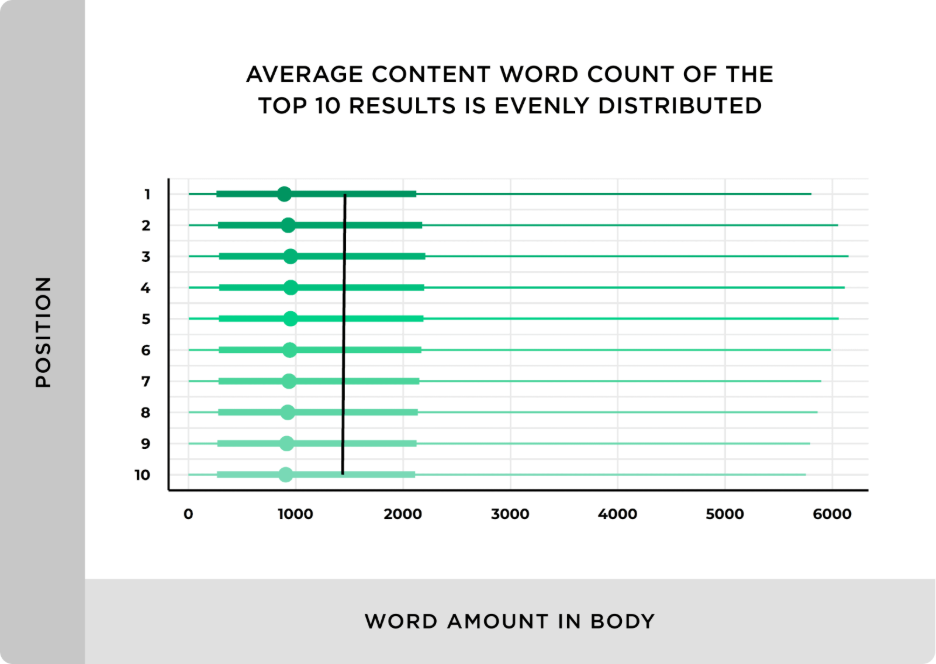
Content with more words can cover a wider breadth. This point relates to content depth rather than URL structure. For your URLs, focus on categories and levels that add useful context to the page while keeping the hierarchy clear and focused.
However, keep the hierarchy focused so that each level contributes meaningful information and the URL remains easy to understand.
- Example of a Well-Organized URL: https://example.com/clothing/mens/t-shirts
Here, “clothing” identifies the broader category, “mens” narrows it to a relevant subcategory, and “t-shirts” identifies the specific page topic. This gives both users and search engines useful context about the page’s position within the site.
4. Use Secure URLs (HTTPS)
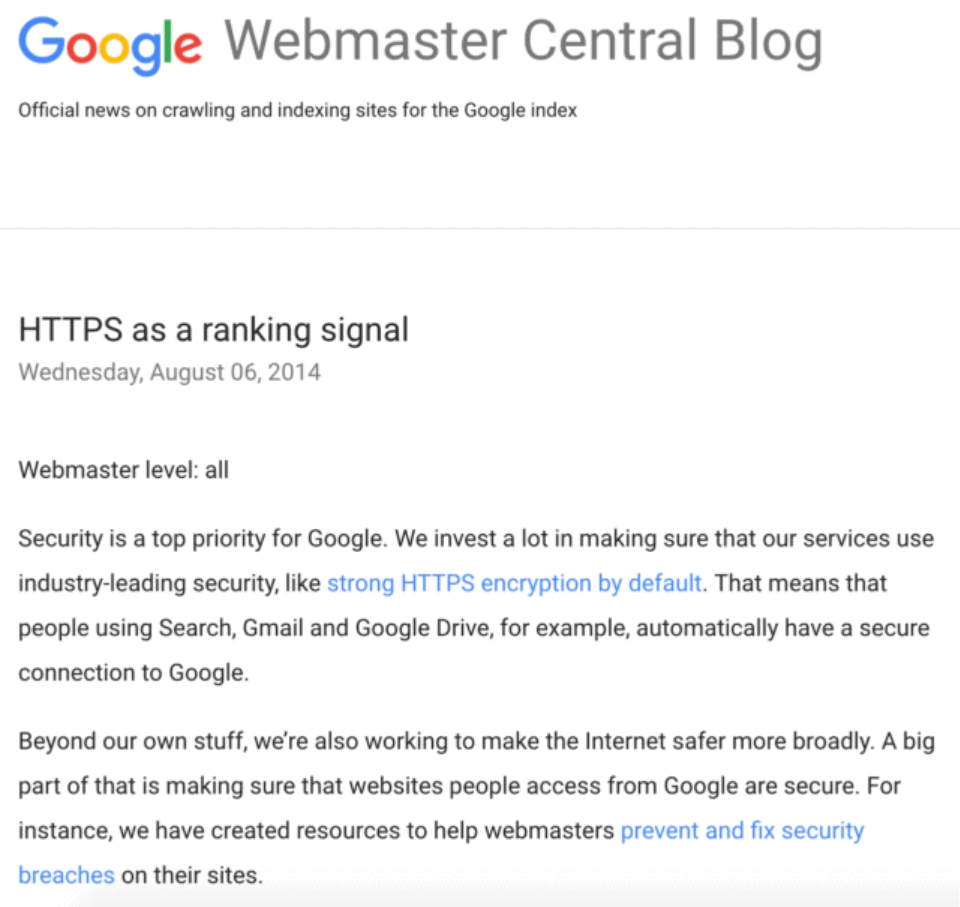
Google has confirmed that HTTPS is a ranking signal, so using HTTPS rather than HTTP is recommended.
backlinko.com
According to Google, however, HTTPS only acts as a ‘tiebreaker.’
In addition to improving your SEO, this also enhances your users’ security. HTTPS encrypts the connection between a user’s browser and your website, giving visitors a more secure experience when accessing your pages.
- Good Example: https://example.com
- Bad Example: http://example.com
If you haven’t already, make sure your website is updated to HTTPS. You should also ensure that your HTTP pages redirect to their HTTPS equivalents so visitors and search engines are consistently directed to the secure version.
5. Avoid Using Dynamic Parameters
Avoid unnecessary URL parameters when possible. Parameters such as ?, =, and & can create long or complex URLs, especially when several parameters are used together. Keep your URLs simple when parameters are not needed. When parameters serve a genuine function, such as filtering or tracking, use them thoughtfully and keep the underlying URL structure as clear as possible.
- Bad Example: https://example.com/article?id=1234&category=5678
- Good Example: https://example.com/blog/ultimate-seo-guide
Clean, descriptive URLs are easier for people to read and understand. A simpler structure can also make URLs easier to share, review, and manage across your website.
6. Implement a 301 Redirect for URL Changes
Make sure to use a 301 redirect from the old URL to the new one if you ever need to alter a page’s URL. A 301 redirect helps send users and search engines to the new page while helping transfer relevant signals from the old URL to the new one.
- Example: If you change https://example.com/old-url to https://example.com/new-url, make sure to set up a 301 redirect from the old URL to the new one.
After changing a URL, update your internal links to point directly to the new address. This gives users and search engines a clear path to the current page and helps keep your site structure organized.
7. Avoid Keyword Stuffing
Although it’s useful to include relevant keywords in your URL, avoid using too many. Keyword-stuffed URLs can look spammy and make the URL harder for users to read and understand.
- Bad Example: https://example.com/buy-best-running-shoes-best-running-shoes-sale
Make sure your URLs are readable and organic. Use the main topic or a relevant phrase when it fits naturally, and prioritize a clear URL that accurately describes the page.
Common SEO URL Mistakes to Avoid
Let’s examine some typical errors to avoid when designing your URL structure now that we’ve discussed excellent practices.
1. Changing URLs Without a Redirect
As was previously said, if you change your URL without using a 301 redirect, you may send users and search engines toward an outdated address and create broken paths to the page. In order to maintain your SEO, always reroute old URLs to new ones. After making the change, update your internal links to point directly to the new URL so visitors can reach the correct page more easily.
2. Creating Duplicate Content
If the same or very similar content is available at multiple URLs, search engines may have difficulty determining which version to show in search results. For instance, https://example.com/page and https://www.example.com/page can represent different URL versions of the same page. Use redirects or canonical tags to help search engines identify the preferred version. This gives search engines a clearer indication of which URL should represent the content in search results.
3. Using Non-Descriptive URLs
A URL such as https://example.com/page12345 does not provide any clue as to the subject matter of the article. Use clear, descriptive URLs that include relevant words when they naturally fit the page topic, helping visitors and search engines understand the content of the page. A descriptive URL can also give users useful context before they decide to click a search result or shared link.
4. Letting URLs Drift from Page Topic
A URL should continue to provide useful context about the page it represents. For example, a URL such as https://example.com/2022-marketing-trends may become less descriptive if the page has been substantially updated to focus on marketing trends for 2026.
When you significantly update a page, review its URL alongside the content and title. If the existing URL still accurately represents the page, keeping it can provide continuity; when a URL change genuinely improves clarity, use a 301 redirect and update your internal links.
5. Overusing Subdomains
Although subdomains, like blog.example.com, can be useful for organizing different parts of a website, use them when they serve a clear organizational purpose. Keeping related content within a consistent site structure can make your website easier for users and search engines to understand and manage. Before creating a subdomain, consider whether the content would fit naturally within your existing website structure and URL hierarchy.
Make Your URL Structure Work for SEO
An SEO-friendly URL structure can make your website easier for users and search engines to understand and navigate. Clear, descriptive URLs help visitors know what to expect from a page before they click, while a consistent structure makes your site easier to organize and manage.
URL optimization is only one part of a broader SEO strategy, so it should support, rather than replace, other SEO efforts. Review your URLs regularly and remove unnecessary words, parameters, and complexity. When you change a URL, use a 301 redirect and update your internal links to help users and search engines reach the right page.
FAQs
1. What makes a URL SEO-friendly?
A clear, descriptive URL that uses lowercase letters, hyphens, and relevant words while avoiding unnecessary complexity. It should give users and search engines a useful idea of what the page is about.
2. Do shorter URLs really rank better?
Not necessarily. Some studies have found a correlation between shorter URLs and higher search rankings, but URL length alone does not determine rankings. Focus on keeping URLs concise, descriptive, and easy to understand.
3. Should I use keywords in every URL?
Only when they fit naturally. Including relevant words can help users understand a page’s topic, but forcing keywords into every URL can make it harder to read and may create an over-optimized appearance.
4. What happens if I change a URL without redirecting it?
Changing a URL without a redirect can leave old links pointing to a missing page and may affect traffic and search visibility. When you permanently change a URL, use a 301 redirect from the old URL to the new one and update your internal links.
5. How do canonical tags help with URLs?
Canonical tags help search engines identify the preferred URL when multiple URLs contain the same or very similar content. They can help search engines understand which version you want to appear in search results.
6. Should I include categories and subcategories in my URLs?
Categories and subcategories can help create a logical URL hierarchy when they add useful context to the page. For example, /clothing/mens/t-shirts shows how the page relates to the broader clothing category and menswear section. Keep the structure focused and include only levels that help users understand the page.
7. Should I change an old URL to make it more SEO-friendly?
Changing an existing URL can be useful when the current address no longer describes the page accurately or fits your website’s structure. If you make a permanent change, use a 301 redirect from the old URL to the new one and update your internal links so visitors and search engines can reach the current address.

About the author: Vibhav Gaur, Business Head
Vibhav Gaur leads strategic operations and business growth at the organization. With a strong background in digital transformation and customer-focused solutions, he has helped numerous clients streamline their web presence and scale efficiently. His leadership ensures seamless execution across teams, with a commitment to delivering results and fostering innovation in every project.


